
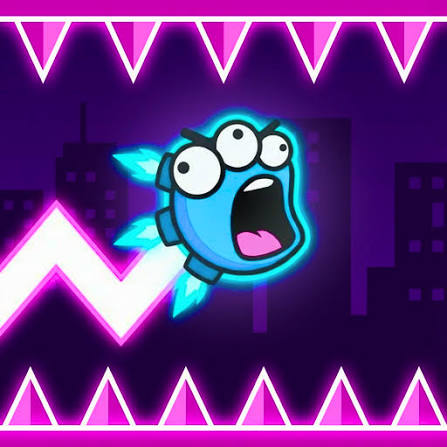


Neon Challenge Legends
Neon Challenge Legends is a fast neon skill game where you hold to rise, release to fall, dodge hazards, collect stars and coins, and master increasingly difficult obstacle courses.
Neon Challenge Legends is a fast skill game where you guide a small neon character through glowing obstacle courses filled with spikes, moving walls, rotating hazards, and narrow passages. The controls are simple: hold to move upward and release to fall. The difficult part is keeping the movement smooth enough to reach the finish without touching anything dangerous.
What helped me most was stopping myself from holding the button too long. Big movements make the character harder to correct. Short presses give much better control, especially when the path becomes narrow or several hazards appear close together.
| Game Detail | Information |
|---|---|
| Game | Neon Challenge Legends |
| Developer | Jungle Tavern |
| Genre | Skill / Arcade |
| Gameplay Style | Precision movement, obstacle dodging and star collecting |
| Controls | W, Up Arrow, Spacebar or Left Mouse Click |
| Supported Devices | Desktop, phone and tablet |
| Browser Release | February 2026 |
| Latest Verified Update | May 2026 |
| Current Rating | 4.3/5 |
| Current Votes | 579K+ |
| Multiplayer | Single-player |
| Extra Mode | Endless mode available in the mobile version |
The current browser listing confirms Jungle Tavern as the developer and describes the game around reflexes, precise movement, coin collection, character skins, and three stars hidden throughout each level.
Hold to Rise and Release to Fall
Neon Challenge Legends uses one main movement idea.
Hold the control and your character rises.
Release it and gravity pulls the character downward.
That sounds easy, but every obstacle changes how long you should hold.
A wide opening may allow a longer press.
A narrow tunnel usually needs several short corrections.
This makes the game more about rhythm than raw speed.
Neon Challenge Legends Controls
You can use several inputs for the same action:
- W: Hold to move up
- Up Arrow: Hold to move up
- Spacebar: Hold to move up
- Left Mouse Button: Hold to move up
- Release: Move downward
- R: Restart the level
These controls are confirmed by the current browser version.
The MDN KeyboardEvent documentation explains how browser games detect keyboard controls such as W, Spacebar, and Arrow Keys.
Short Inputs Give Better Control
The easiest mistake is holding the control too long.
That sends the character higher than intended and leaves less room to recover.
I find short taps or holds much easier to manage.
Move slightly upward.
Release.
Watch the path.
Then adjust again.
This keeps the character closer to the centre of the safe route.
Spikes
Spikes are one of the most common hazards.
They often appear on floors, ceilings, or both.
The main challenge is not simply avoiding one spike.
It is keeping enough vertical space to deal with whatever comes immediately after it.
If you move too close to the ceiling to avoid a floor spike, the next obstacle may leave no room to correct.
Rotating Obstacles
Rotating hazards add timing to the movement.
Instead of aiming only for an empty gap, you also need to judge when that gap is actually safe to enter.
The easiest approach is to watch one full movement cycle when possible.
That gives you a clearer idea of when to move rather than reacting late.
Moving Walls
Moving walls can make otherwise simple corridors much harder.
They change the amount of safe space available while you are already travelling through the section.
I would avoid entering at maximum height or minimum height.
Keeping the character closer to the middle usually leaves more room for correction.
Use Slides for Momentum
The current Poki description specifically mentions slides that can help you build momentum.
That changes the movement slightly because you are not always travelling at the same pace.
Once speed increases, small control mistakes become more noticeable.
The useful habit is preparing for the next obstacle before the slide finishes rather than waiting until you are already moving faster.
Three Stars in Every Level
Each level includes three collectible stars placed in difficult positions.
You can treat them as optional challenges.
The safest way to play is to complete the level first.
Then return for stars once you understand the obstacle pattern.
Trying to collect all three immediately can make a new level much harder than necessary.
Coins
Coins are another important collectible.
You can earn them while progressing through the levels and use them to unlock additional character skins.
This gives repeated play another purpose beyond simply reaching the finish.
Coins also encourage you to try routes you might otherwise ignore.
Unlocking Character Skins
Collected coins can be used to unlock new looks for the neon character.
These skins mainly change appearance rather than the core movement.
That means you can choose the one you like without worrying about losing a gameplay advantage.
The real improvement still comes from better timing.
Learn the Safe Line First
Every level has a route that feels easier once you understand it.
Instead of immediately chasing every star, find the safest line through the obstacles.
Remember:
where to rise,
where to release,
where the path narrows,
and where momentum changes.
Once that route becomes familiar, collecting the harder stars becomes much easier.
Restart Quickly With R
The R key immediately restarts the level.
That is useful because failed attempts are common.
Instead of treating each crash as wasted progress, use it to learn where the movement went wrong.
The game becomes easier when you change one small part of the timing rather than repeating the same input faster.
Tight Corridors
Narrow passages are often harder than large moving hazards.
There is less space to recover after a mistake.
Short inputs work best here.
Hold briefly to rise.
Release briefly to fall.
Try to keep the character near the middle of the corridor rather than bouncing between the floor and ceiling.
Momentum Changes the Difficulty
The game is not only about position.
Speed matters too.
A movement that works at normal speed may be too slow once a slide increases momentum.
That means you need to adapt instead of repeating the exact same rhythm through every section.
Endless Mode
The Google Play version includes an Endless mode where the goal is to travel as far as possible.
This mode changes the focus.
Normal levels ask you to reach a finish.
Endless mode is more about maintaining control for as long as possible.
That makes consistency more important than learning one fixed layout.
Hand-Crafted Levels
The mobile listing describes the stages as hand-crafted obstacle courses with increasing difficulty.
That means the challenge comes from designed patterns rather than completely random layouts.
Repeated attempts therefore help.
Once you remember how a section works, the same obstacle becomes much easier to handle.
Mobile and Tablet Play
Neon Challenge Legends supports phones and tablets as well as desktop computers.
Touch controls fit the game well because the main action is just holding and releasing.
There is no virtual joystick or complicated set of buttons.
The W3C Pointer Events standard explains how modern browsers support mouse, touch, and other pointer input through one shared system.
Android Version
Neon Challenge Legends also has an Android edition.
Google Play lists it under WebVentures B.V. and shows an update dated June 5, 2026.
The mobile listing includes:
- One-touch controls
- Hand-crafted levels
- Coins
- Three-star objectives
- Character skins
- Endless mode
This is useful context because the mobile edition includes some features that may not always be described in detail on the browser page.
Who Created Neon Challenge Legends?
The browser version credits Jungle Tavern as the developer.
Poki also connects Jungle Tavern with:
- Count Control Legends
- Fashion Legends
- Supercar Legends
That shows the game belongs to a wider “Legends” group from the same developer profile.
Release and Latest Update
Poki lists Neon Challenge Legends as released in February 2026.
The newest browser update currently shown is May 2026.
The Android edition was updated slightly later, on June 5, 2026.
Because the browser and mobile versions have different update histories, those dates should be kept separate.
Current Rating
The current Poki listing shows approximately:
4.3 out of 5
from more than:
579,000 votes.
That number can continue changing as more players rate the game.
Is Neon Challenge Legends Multiplayer?
The verified browser version is single-player.
The game focuses on completing obstacle courses, collecting stars, earning coins, and improving your own performance.
There is no current verified live multiplayer mode in the standard browser version.
A Better Way to Handle Hard Levels
When a level keeps causing problems, separate it into smaller sections.
First learn the opening.
Then focus on the first difficult obstacle.
Once that becomes consistent, work on the next one.
Do not try to memorize the entire course at once.
This makes progress easier to measure.
Neon Challenge Legends vs Regular Platform Games
A normal platform game may use left, right, and jump controls.
Neon Challenge Legends is different.
You mainly control vertical movement while the course keeps moving forward.
That means the main skills are:
- Timing
- Rhythm
- Vertical control
- Momentum
- Obstacle reading
- Repeated practice
This makes it closer to a precision arcade challenge than a traditional platform game.
Games Like Neon Challenge Legends
Players who enjoy Neon Challenge Legends may also like other skill games built around timing and obstacle avoidance.
Glitch Dash is a strong Prothots internal-link choice because it also focuses on repeated attempts, reflexes, and learning obstacle patterns.
Tunnel Rush 2 would also fit readers who enjoy quick reaction challenges.
Fashion Legends is from the same developer, but the gameplay is completely different, so it is a weaker contextual link unless you want to connect more Jungle Tavern games.
I could not verify exact Prothots URLs for these pages through search, so the final internal links should use URLs from your live sitemap rather than guessed paths.
Related Categories
Neon Challenge Legends fits naturally into:
- Skill Games
- Arcade Games
- Reflex Games
- Obstacle Games
- Platform Games
- Timing Games
- Mobile Games
- Single-Player Games
Its strongest identity is a precision skill game because almost every level depends on small movement corrections and accurate timing.
About Neon Challenge Legends
Neon Challenge Legends takes one very simple control idea and makes it increasingly difficult through clever obstacle placement.
Hold to rise.
Release to fall.
Everything else comes from learning how long each movement should last.
Spikes, rotating hazards, narrow corridors, moving walls, stars, coins, and speed-changing slides all force you to adjust the same basic action in different ways.
The most useful habit is making smaller corrections. Once you stop overreacting to every obstacle, the movement becomes smoother and difficult sections start feeling much more predictable.

Reviews
There are no reviews yet.