
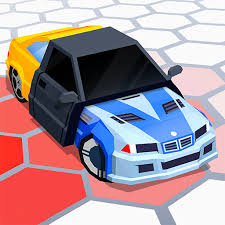


3D Arena Racing
3D Arena Racing is a 3D driving game where you race across eight tracks, unlock nine vehicles, challenge computer drivers, play local two-player races, and use a free-roam arena.
3D Arena Racing is a 3D driving game where you race across eight tracks, earn money from successful events, unlock better vehicles, and test your driving in a separate free-roam arena. The garage includes nine different vehicles ranging from racing cars and karts to monster trucks and Formula-style cars. You can race alone against computer-controlled opponents or share the keyboard with a friend in local two-player mode.
The biggest mistake is treating every vehicle as if it handles the same way. I find it easier to use the first lap to understand how quickly a car turns and how much speed it loses away from the road. Once that feels predictable, pushing harder for first place becomes much easier.
| Game Detail | Information |
|---|---|
| Game | 3D Arena Racing |
| Developer | Brain Software |
| Genre | Racing / Driving |
| Gameplay Style | Circuit racing, vehicle progression and free roaming |
| Controls | Arrow Keys and WASD |
| Supported Browser Device | Desktop |
| Original Browser Release | November 2017 |
| Poki Release | March 2019 |
| Latest Verified Poki Update | June 2022 |
| Current Rating | 4.4/5 |
| Current Votes | 500K+ |
| Vehicles | 9 |
| Racing Tracks | 8 |
| Multiplayer | Local 2-player split-screen |
Poki currently credits Brain Software as the developer. Some older hosting pages attribute development or publishing differently, so Brain Software is the clearest developer attribution for the current Poki edition.
Race Through Eight Different Tracks
3D Arena Racing includes eight main racing courses.
Available descriptions divide these between mud-style arena tracks and more traditional circuits. Each layout asks you to manage corners, road surfaces, and other racers while trying to finish near the front.
Learning the course is usually more useful than immediately buying a faster car.
Once you know where the sharp corners appear, you can prepare earlier and avoid losing speed through unnecessary corrections.
Start With One Car
You do not begin with the entire vehicle collection.
The game starts you with one available car, while additional vehicles can be opened using money earned through single-player races.
That gives racing a clear progression loop:
race,
earn money,
unlock another vehicle,
then test whether it performs better on the next course.
It is worth trying a newly unlocked car before assuming it is automatically better for every track.
Nine Vehicles to Unlock
The game includes nine different vehicles.
The selection includes several types rather than nine nearly identical racing cars. Listings mention:
- Racing cars
- Formula-style cars
- Karts
- Muscle cars
- Monster trucks
- SUVs
- Motorcycles
The variety changes how each race feels because a compact vehicle and a larger truck do not take corners in exactly the same way.
3D Arena Racing Controls
The local multiplayer controls are split across one keyboard.
Player 1: Arrow Keys
Player 2: WASD
Both control sets handle acceleration, braking, and steering.
The MDN KeyboardEvent documentation explains how browser games recognize keyboard inputs such as WASD and Arrow Keys.
Having separate control areas makes it possible for two players to race without needing an extra controller.
Stay on the Track
Leaving the racing surface costs speed.
Available descriptions specifically note that driving onto sand or grass slows the vehicle, which gives opponents an easy chance to overtake.
This makes clean cornering important.
Entering a bend slightly slower can sometimes be faster overall if it keeps all four wheels on the road.
Avoid the Walls
Walls can also ruin a good lap.
Hitting one can interrupt the car’s direction and cause you to lose several racing positions while correcting the vehicle.
I would focus on entering corners under control rather than trying to turn only after reaching the wall.
The earlier correction usually requires less steering.
Single-Player Racing
Single-player mode puts you against computer-controlled drivers.
Successful races help you earn money and open more of the vehicle collection.
This mode is the best place to learn a new track because you can concentrate on:
corner timing,
road position,
vehicle handling,
and where the AI becomes slower.
Once those parts feel familiar, competing for first place becomes easier.
Local Two-Player Racing
3D Arena Racing also supports local split-screen multiplayer.
Two people can race on the same computer, with one using the Arrow Keys and the other using WASD.
This is local multiplayer rather than internet matchmaking.
Both players share the same device.
Split-Screen Mode
The screen divides during two-player racing so each driver can follow their own vehicle.
That gives each player an independent view while keeping both people in the same race.
The same two-player setup can also be used in the free-roaming area according to current game listings.
Free Roam Mode
Not every session has to be a race.
3D Arena Racing includes a large free-roam arena where you can drive without concentrating on finishing first.
This area includes stunt-style structures and gives you room to test vehicles.
It is also one of the easiest places to learn how a newly unlocked car turns before using it in competition.
Practice New Cars in Free Roam
The free-roam area is useful for more than casual driving.
Before taking a new vehicle into a race, test:
how quickly it accelerates,
how sharply it turns,
how easily it recovers after changing direction,
and how wide it feels.
A few moments of practice can prevent several mistakes in the next race.
Smaller Cars Can Feel Easier
Older official hosting information notes that smaller vehicles can accelerate quickly and are easier to manoeuvre through curves.
That is worth remembering when choosing between a visually impressive large vehicle and something smaller.
Top speed does not decide every race.
A vehicle that handles difficult corners cleanly can recover far less time after each turn.
Learn Corners Before Chasing Speed
A useful first run is not always the fastest run.
On an unfamiliar course, pay attention to:
where the road tightens,
where the surface changes,
where opponents usually slow,
and where you regularly leave the track.
Then use the next race to improve those specific places.
That produces more reliable progress than simply accelerating harder.
Watch the Road Surface
Mud, grass, sand, and normal track surfaces do not all give you the same result.
The clearest verified difference is that leaving the intended road surface can slow the car significantly.
That means cutting a corner too aggressively can actually cost more time than following the proper route.
Racing Against Four Drivers
Some versions place you in races with several computer-controlled opponents, with VitalityGames specifically describing four rival drivers during races.
That makes the opening part of a race crowded.
Trying to force through every vehicle immediately can send your car off line.
It is often easier to wait for the track to open and then pass where you have more space.
Finishing Position Matters
Y8 describes the progression version as rewarding strong finishes with money that can then be used in the garage.
That connects race performance directly with vehicle progression.
A cleaner finish helps you move toward better vehicles rather than racing only for an isolated score.
Use the Garage
The garage is where vehicle progression becomes visible.
Money earned through racing can be used to buy stronger or different vehicles.
Instead of buying only because a vehicle looks faster, compare how useful it is for the tracks you are currently struggling with.
Handling can matter just as much as raw speed.
Original Browser Release
Older hosting records date 3D Arena Racing to November 2017.
BrightestGames lists November 7, 2017 as its publication date, while its related game distribution record also shows November 2017.
That makes November 2017 the earliest browser release date I could verify.
Poki Release
Poki added its version later.
The current listing gives:
Release: March 2019
Latest update: June 2022
Keeping this date separate from the 2017 original avoids making the game appear newer than it actually is.
Current 3D Arena Racing Rating
The current Poki listing shows approximately:
4.4 out of 5
from more than:
500,000 votes
Ratings and vote totals can continue changing as more people play.
Desktop Browser Support
The verified Poki edition currently lists desktop as its supported device.
Y8 also identifies the game as desktop-focused and uses keyboard-based driving controls.
For this reason, desktop is the safest device classification rather than assuming full mobile support from unrelated republished versions.
WebGL Technology
3D Arena Racing was distributed as a Unity WebGL browser game. Historical distribution information identifies a Unity 5.6+ engine build, while later listings categorize it as WebGL.
The official Unity Web documentation explains how Unity games can run through compatible browsers.
WebGL allows the game’s 3D tracks and vehicles to work without an older browser plugin such as Flash.
Who Created 3D Arena Racing?
For the current Poki edition, the developer is listed as Brain Software.
Some older hosts credit BrightestGames, while another established listing also identifies Brain Software.
Because the current Poki page directly credits Brain Software, that is the developer name I would use on the Prothots game page while treating BrightestGames as an earlier publisher or host rather than mixing both names in the main table.
Is 3D Arena Racing Multiplayer?
Yes.
The game supports local two-player split-screen racing on the same computer.
It does not need to be described as online multiplayer.
The verified multiplayer setup is two people sharing one device and separate keyboard controls.
A Better Way to Improve
Use the first race to learn the track.
Then identify the corners where you repeatedly leave the road.
Practice keeping the vehicle on the racing surface.
Once that becomes consistent, try a different car.
Finally, compare whether the new vehicle actually improves your results.
This approach makes vehicle upgrades easier to judge because you are not changing the car and learning the track at the same time.
3D Arena Racing vs Open-World Driving Games
3D Arena Racing combines structured races with one free-roaming environment.
The main experience focuses on:
- Eight racing tracks
- Nine vehicles
- Computer opponents
- Money and vehicle progression
- Local two-player racing
- Split-screen play
- A free-roam stunt arena
That gives it more structure than a pure open-world driving game while still allowing some driving without race objectives.
For Prothots, Tuning Car Racing would be a useful related internal link because both games focus on learning different vehicles and racing across 3D tracks.
Flying Car Simulator is another natural connection for readers who prefer freer vehicle movement.
Cars Thief can also fit players looking for open-city driving rather than circuit racing.
Use the exact live Prothots URLs from your sitemap when adding these links.
Related Categories
3D Arena Racing fits naturally into:
- Racing Games
- Driving Games
- Car Games
- 2 Player Games
- 3D Games
- Local Multiplayer Games
- Stunt Games
- WebGL Games
Its strongest identity is a 3D racing game because structured races, vehicle progression, and track performance make up most of the experience.
About 3D Arena Racing
3D Arena Racing gives you more variety than a basic browser circuit game.
You can race through eight tracks, earn money, move through a nine-vehicle garage, challenge computer drivers, share split-screen races with a friend, or leave competition behind for a while in the free-roam arena.
The controls are easy to learn.
The harder part is keeping the vehicle on the fastest line.
For me, the biggest improvement comes from learning the track before blaming the car. Once the difficult corners are familiar, it becomes much easier to tell whether a new vehicle actually helps.





Reviews
There are no reviews yet.