
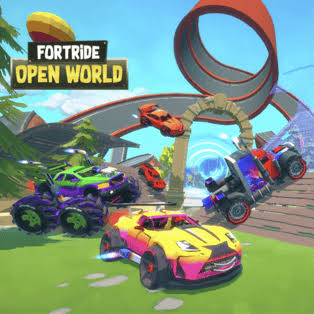


Fortride Open World
Fortride Open World is a 3D sandbox driving game from Brain Software where you freely roam a large map, switch vehicles and build custom roads and ramps. Use boost, find hidden portals and create your own virtual driving routes while experimenting with the game’s open-world construction system.
Fortride Open World is a 3D sandbox driving game from Brain Software where you freely roam a large virtual map, switch between vehicles and build your own roads and ramps. Instead of following one fixed racing circuit, you can decide where to drive and how to reshape parts of the environment. I find testing a short ramp before extending it into a larger route more useful than building several pieces at once because it makes mistakes easier to correct.
| Game Detail | Information |
|---|---|
| Game | Fortride Open World |
| Developer | Brain Software |
| Genre | Driving |
| Gameplay Style | Open-world driving, sandbox construction, vehicle switching and virtual stunt courses |
| Controls | Arrow Keys, Spacebar, Shift + Arrow Keys, Q, WASD |
| Supported Device | Desktop |
| Poki Release Date | June 2020 |
| Latest Poki Update | November 2020 |
| Technology | WebGL |
| Poki Rating | 4.5 |
| Poki Votes | 570K+ |
| Multiplayer | Single-player |
About Fortride: Open World
Fortride: Open World removes the fixed-track structure found in many racing games and replaces it with a large sandbox.
You can drive around the map, find unusual areas, switch vehicles and construct road pieces that create your own routes. Ramps can also be added to reach parts of the virtual environment that would otherwise be difficult to access.
Latest Fortride: Open World Update
The current Poki edition lists June 2020 as its platform release date and November 2020 as its latest update.
As of September 2026, Poki shows a 4.5 rating from more than 570,000 votes and lists desktop as the supported device.
Y8 separately records the game as a WebGL single-player title added to its platform in November 2019.
Fortride: Open World Gameplay
The main loop is based on driving, building and experimenting with the map.
You can move freely rather than being forced through one sequence of checkpoints. When you find an area where the existing road ends, the construction system lets you place new pieces and create a custom route.
Controls
- Arrow Keys: Drive
- Spacebar: Boost
- Shift + Arrow Keys: Change vehicle on the Poki version
- Q: Toggle or enter build mode
- WASD: Select construction pieces
- Spacebar in Build Mode: Place the selected piece
These controls are documented by Poki, while older listings sometimes use Left Ctrl + Arrow Keys instead of Shift for vehicle selection.
The MDN KeyboardEvent documentation gives useful technical background on keyboard input in browser games.
Open-World Driving
The map is designed for free movement rather than one continuous race.
You can drive away from the main road, look for ramps and portals, and experiment with different routes around the environment. Y8 specifically describes hidden portals that move your vehicle to other areas of the map.
That freedom is what makes Fortride: Open World feel closer to a driving sandbox than a conventional lap-based racing game.
Building Roads
Pressing Q activates the construction system.
From there, WASD is used to select different road or ramp pieces, and Space places the chosen section.
This lets you extend paths across gaps, create raised routes or simply experiment with unusual track shapes inside the fictional game world.
I find building one section at a time easier because you can test whether the angle works before adding more pieces.
Building Ramps
Ramps are especially useful for connecting areas at different heights.
Poki specifically highlights building ramps to move through the air and create your own virtual driving routes.
Because the vehicle physics react differently depending on speed and angle, a ramp that looks good from a distance may need adjustment after the first test.
Vehicle Selection
Fortride: Open World includes several vehicles rather than locking you into one car.
Poki confirms that players can switch vehicles during play, while other longstanding listings describe a wider selection that includes race cars, trucks and other fictional vehicle types.
Different vehicles can feel noticeably different when turning, accelerating or crossing uneven terrain.
Boost System
Spacebar activates boost during normal driving.
The extra speed can help cross longer virtual gaps or reach the upper part of a ramp, but using it at the wrong time can also make the vehicle harder to control.
I find lining the car up first and boosting second more reliable than trying to correct direction after acceleration has already started.
Portals
Hidden portals appear around the open world.
Y8 specifically mentions using them to move to different parts of the map and uncover more of the game’s challenges.
This gives exploration a reason beyond simply driving in circles.
Nitro Recharge
The map also includes a way to recharge the boost or nitro system more quickly.
Y8 describes finding the secret recharge method as one of the optional challenges scattered around the world.
That turns some parts of the map into small exploration puzzles rather than ordinary roads.
Fortride: Open World Strategy
A practical in-game approach is:
- Learn how your current vehicle handles.
- Explore the nearby roads before building.
- Use short construction pieces first.
- Test each new section.
- Adjust awkward angles before extending the route.
- Use boost only when the virtual vehicle is already lined up.
The mistake I would avoid is trying to create an enormous course before testing the first few pieces.
Custom Tracks
Because road pieces can be placed manually, you can create routes that did not exist when the session started.
Players can combine ramps, curves and straight sections into custom virtual tracks. Longstanding browser listings also describe using the building tools to make bridges and custom courses.
This creative system gives the game more replay value than a single fixed map would provide.
Virtual Air-Time Challenges
The sandbox contains jumps and elevated sections designed around exaggerated in-game vehicle physics.
PacoGames describes the game as encouraging players to experiment with loops and keeping the vehicle airborne inside the virtual environment.
These are arcade-style game mechanics rather than real-world driving activities.
Resetting Your Vehicle
Some versions include a reset control when the car becomes stuck or overturned.
PacoGames lists R as the reset key.
This is useful in a sandbox because unusual custom roads can sometimes leave the virtual vehicle in an awkward position.
Fortride: Open World Progression
Fortride: Open World does not use a traditional campaign with a long list of numbered races.
Progress mainly comes from:
- Exploring the map
- Finding portals
- Trying different vehicles
- Building custom roads
- Creating ramps
- Learning the vehicle physics
- Finding optional challenges
- Building increasingly complex routes
Y8 also characterizes the game as a single-player open-world driving experience rather than a level-based campaign.
Who Created Fortride: Open World?
Fortride: Open World was created by Brain Software, sometimes written as BrainSoftware.
Poki directly credits Brain Software and connects the developer with several other vehicle-focused games.
Some third-party pages incorrectly attribute the game to other publishers, so Brain Software is the stronger developer credit for the Poki version.
Browser And Platforms
The current Poki edition supports:
- Desktop
Poki specifically lists desktop as the supported device.
Y8 also says the game is designed for desktop play and works best with a keyboard, while identifying its underlying browser technology as WebGL.
Games Like Fortride: Open World
Brain Software is also known on Poki for vehicle games including:
- Park It
- Parking Fury
- Off-Road Cargo
Poki directly mentions these series when describing the developer.
For a different physics-focused browser challenge, Get On Top replaces cars and road construction with short balance-based matches.
Disaster Arena offers another type of changing arcade challenge rather than an open driving sandbox.
About This Game
Fortride: Open World works because building and driving are connected.
You are not simply given a road and told to follow it. You can add new sections, test them with different vehicles and gradually turn parts of the map into your own custom virtual course.
Portals, boost mechanics and different vehicle choices provide additional reasons to keep exploring after learning the basic controls.
Related Categories
Fortride Open World fits naturally into:
- Driving Games
- Car Games
- Open-World Games
- Sandbox Games
- Building Games
- 3D Games
- Simulation Games
- WebGL Games
Poki currently places it primarily under Driving Games, while Y8 also associates it with 3D, Car, Simulation and WebGL categories.
More Games From This Developer
Brain Software is connected with several other vehicle-focused games, including:
- Park It
- Parking Fury
- Off-Road Cargo
These are specifically named by Poki as other games and series from the same developer.
Get The Game
Fortride Open World runs directly through a supported desktop browser.
Use the arrow keys to drive, Spacebar for boost and Q to enter construction mode. Build short road sections first, test them with your chosen vehicle and gradually extend the route as you learn how the game’s virtual physics respond.






Related products



Reviews
There are no reviews yet.