
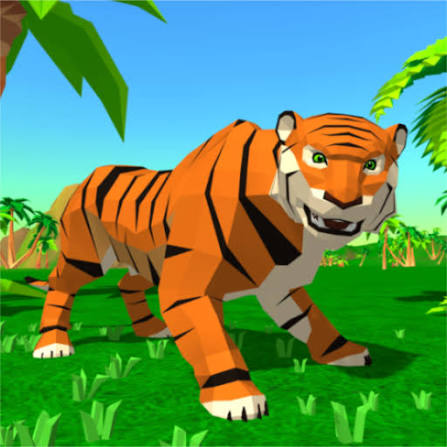


Tiger Simulator 3D
Tiger Simulator 3D is an open-world animal game where you explore the wild, hunt for food, complete quests, upgrade your tiger, find a companion, and raise a family.
Tiger Simulator 3D is an open-world animal simulation game from CyberGoldfinch where you live as a tiger, travel through a large natural environment, hunt for food, complete quests, improve your abilities, and eventually build a tiger family. You are not locked into one fixed mission path, so much of the game involves deciding whether to explore, hunt, follow quests, or work on your family’s progression.
The first thing I would learn is movement before chasing every animal nearby. Running constantly makes it easy to overshoot targets or move into a difficult encounter without enough room to react. Once the tiger’s turning and attack distance feel familiar, hunting and quest objectives become much easier to manage.
| Game Detail | Information |
|---|---|
| Game | Tiger Simulator 3D |
| Developer | CyberGoldfinch |
| Genre | Simulation, Animal, Adventure |
| Gameplay Style | Open-world exploration, hunting, quests and family progression |
| Controls | WASD / Arrow Keys, Left Mouse Button, Spacebar, Shift |
| Supported Browser Devices | Desktop, phone and tablet on current CrazyGames edition |
| Original Browser Release | April 2018 |
| Poki Release | March 2019 |
| Latest Verified Browser Update | June 26, 2025 |
| Latest Verified Android Update | April 2, 2026 |
| Poki Rating | 4.5/5 |
| Poki Votes | 1.1M+ |
| Multiplayer | Single-player |
CrazyGames identifies April 2018 as the original browser release and June 26, 2025 as its latest browser update. Poki lists its own edition from March 2019, so those platform dates should be kept separate rather than treated as one release history.
Explore Before Taking Every Fight
Tiger Simulator 3D gives you a large environment containing different animals and quest locations.
Some creatures are peaceful.
Others are much more dangerous.
That makes exploration more useful than simply attacking everything you see.
I would spend the opening part of the game learning where animals, quests, and safer routes are located. Once you understand the area, it becomes easier to decide which encounters are worth taking.
The game includes creatures ranging from smaller animals to much stronger opponents, so not every encounter should be approached in the same way.
Tiger Simulator 3D Controls
The main browser controls are:
WASD or Arrow Keys: Move
Left Mouse Button: Attack
Spacebar: Jump
Shift: Run faster
These controls are confirmed by the current CrazyGames and Poki editions.
For technical background, the MDN KeyboardEvent documentation explains how browser games recognize individual keyboard inputs such as WASD, Arrow Keys, Shift, and Spacebar.
The control layout is simple enough that most of the challenge comes from timing and positioning rather than memorizing a large number of buttons.
Hunting for Food
Food is an important part of progression.
You can hunt animals and gather meat, which later helps support your tiger family.
The current game description specifically connects hunting with feeding and improving your companion and cubs.
I would avoid chasing prey endlessly across the entire map.
If an animal moves too far away or toward a dangerous area, another target may be easier.
The goal is useful progress rather than turning every chase into a long detour.
Find a Tiger Companion
One of the game’s larger progression systems is building a tiger family.
You can find another tiger and form a pair.
That companion is more than a visual addition because family members can help during hunting and combat.
The current version also allows family members to be improved over time.
This gives the game a different structure from animal simulators that focus only on one character.
Raise Tiger Cubs
After progressing far enough, you can unlock tiger cubs.
CrazyGames currently describes a family system supporting up to four cubs.
Those cubs can join your broader family progression rather than remaining simple background characters.
You can support them with food and improve the family’s overall strength.
I would build the main tiger’s basic progression first before worrying too much about maximizing every family member immediately.
Improve Your Tiger Family
Family members can be upgraded through continued hunting and resource collection.
That means food has two purposes.
It helps you survive and also contributes to longer-term family development.
A useful routine is:
complete nearby quests
hunt along the same route
collect enough food
return to family progression
then move toward the next area
Keeping those activities connected saves time compared with treating them as completely separate tasks.
Tiger Skins and Customization
Tiger Simulator 3D also includes appearance customization.
You can change skins and use additional cosmetic items such as hats in supported versions.
CrazyGames and the current App Store description both confirm customization for the tiger and its family members.
These changes are mainly visual.
They do not replace upgrades to attack, health, stamina, or other gameplay abilities.
I would choose the look you prefer and treat progression separately.
Complete Quests Around the Map
Quests give exploration more direction.
The current game includes different objective types rather than repeating one hunting mission.
You may be asked to:
- hunt particular animals
- find ancient artifacts
- travel to specific places
- complete unusual activities
- interact with parts of the environment
CrazyGames even notes that some quests involve launching fireworks.
That variety prevents every task from feeling like the same hunt repeated with a different target.
Look for Quest Markers Before Wandering
When a new task becomes available, check its location before running across the map.
It is easy to move far away and then realize the objective was close to where you started.
I would group nearby activities together.
If one quest takes you toward an area with useful animals or collectibles, complete those while you are already there.
This makes progression feel much smoother.
Upgrade Attack, Energy and Health
Character improvement is another major system.
Current versions let you strengthen individual attributes such as:
- attack
- energy or stamina
- health
These upgrades affect how comfortably you can handle harder areas.
I would not spread upgrades randomly.
Notice what currently causes problems.
If fights last too long, attack may matter more.
If you struggle to stay active during long encounters, energy may deserve attention.
If you are being defeated too quickly, health becomes more useful.
Special Skills
Tiger Simulator 3D also includes special abilities that support progression.
Current descriptions mention improvements that can:
- increase movement speed
- improve food collection
- increase resources earned from activities
- support other progression systems
These bonuses can make repeated tasks easier.
I would prioritize skills that improve activities you already perform often.
A bonus that helps one rarely used action may be less valuable than something affecting almost every hunt or quest.
Stronger Animals Need More Preparation
Not every creature in the environment has the same difficulty.
Some can be approached relatively safely.
Others can be dangerous enough that upgrading first is the better decision.
The Google Play version also mentions powerful boss-style enemies.
If one opponent repeatedly causes problems, that does not necessarily mean you need faster attacks.
It may simply mean your tiger is not developed enough yet.
Completing easier quests and improving your attributes can be more effective than repeating the same difficult encounter.
Running vs Normal Movement
Holding Shift lets the tiger move faster.
Running is useful for covering long distances or catching moving targets, but I would not hold it constantly.
Higher speed can make tight turns less precise.
Normal movement gives you more control when approaching an animal or quest location.
The simplest pattern is:
run across open ground
release Shift before a tight area
position the tiger
then attack or interact
This prevents unnecessary corrections.
Jumping Across the Environment
The Spacebar makes the tiger jump.
Jumping can help with environmental movement and navigating uneven sections.
It is not something you need to use constantly.
I would save it for obstacles or terrain changes where normal running does not give enough movement.
Random jumping during a chase can make positioning harder rather than easier.
The Open Environment
Tiger Simulator 3D is designed around a broad natural area rather than one narrow level.
That makes the game closer to an animal sandbox than a stage-based simulator.
You can encounter different creatures, search for quest objectives, and move between activities without returning to a traditional level-selection menu every few minutes.
This structure is one reason understanding the map becomes useful.
Familiar routes make repeated quests and hunting trips much faster.
Browser and Mobile Versions
Tiger Simulator 3D has several active versions.
CrazyGames currently supports:
- Desktop
- Phone
- Tablet
and lists June 26, 2025 as its most recent browser update.
Poki currently lists its browser edition as desktop-only and gives June 2022 as that platform’s latest update.
The Android edition is also actively maintained. Google Play shows an update on April 2, 2026.
These are separate platform histories, so one update date should not automatically be applied to every version.
Android Version
CyberGoldfinch publishes Tiger Simulator 3D directly on Google Play.
The Android version currently has more than 1 million downloads and continues to receive maintenance updates.
The official Google Play listing is the best place to check current Android compatibility and update information.
The mobile description confirms the same major systems:
family progression
customization
upgrades
different creatures
quests
boss encounters
iPhone and iPad Version
Tiger Simulator 3D is also available through Apple’s App Store.
The iOS version identifies Sergei Zykov as the developer and supports iPhone and iPad.
Its current description confirms features including a tiger companion, up to four cubs, family upgrades, skins, hats, hunting, and open-world exploration.
The official App Store page provides the current Apple version details.
Who Created Tiger Simulator 3D?
Tiger Simulator 3D was developed by CyberGoldfinch.
The developer is also associated with several other animal simulation games, including:
- Dragon Simulator 3D
- Fox Simulator
- Wolf Simulator
- Dog Simulator 3D
- Horse Simulator 3D
- Raccoon Adventure Simulator 3D
- Parrot Simulator
CyberGoldfinch has built a recognizable series around controlling different animals in 3D environments.
That makes Tiger Simulator 3D part of a much larger animal-simulator catalogue rather than a standalone experiment.
Tiger Simulator 3D Release History
The platform dates are worth separating.
April 2018: CrazyGames records the original browser release.
March 2019: Poki lists the release of its edition.
June 2022: Poki currently lists its latest platform-specific update.
June 26, 2025: CrazyGames records a newer browser update.
April 2, 2026: Google Play records the latest Android update I could verify.
Using these dates separately gives a much clearer picture than calling March 2019 the original release.
Built With Unity
CrazyGames currently identifies the game engine as Unity 2022 for its modern browser edition.
Unity is widely used for 3D games that need environments, character animation, physics, and cross-platform deployment.
The official Unity web documentation explains how Unity projects can run through compatible web browsers.
The engine does not change how you play, but it helps explain how the same game structure can appear across browser, Android, and iOS versions.
Is Tiger Simulator 3D Multiplayer?
The current verified editions are single-player.
Google Play explicitly labels the game as single-player, and the browser versions focus on one player controlling a tiger family.
Your companion and cubs can assist you, but they are game-controlled family members rather than other human players.
I would therefore not describe Tiger Simulator 3D as online multiplayer.
Tiger Simulator 3D vs Other Animal Simulators
The game is most suitable for players who want more than simply moving an animal around a map.
It combines:
- exploration
- hunting
- quests
- character upgrades
- tiger-family progression
- skins
- companions
- cubs
- special skills
That gives it a longer progression loop than a basic wildlife sandbox.
CyberGoldfinch’s other simulators use similar foundations but change the animal abilities and environments.
For example, Dragon Simulator 3D adds flight and fire attacks, while tiger gameplay stays much more grounded around running, hunting, and family development.
A Better Way to Progress
I would use this order:
Learn movement and attack range.
Complete the easiest nearby quests.
Hunt enough food along the way.
Improve the main tiger’s weakest attribute.
Find and develop the family system.
Upgrade useful special abilities.
Move toward stronger creatures only when normal encounters feel manageable.
Keep quest routes and hunting routes connected.
This prevents the progression systems from feeling disconnected.
Real Tigers and the Game
Tiger Simulator 3D uses real animals as inspiration, but its gameplay is fictional and highly simplified.
Real tiger behaviour, social structure, habitat use, and hunting are much more complex than what a casual simulation can represent.
For accurate wildlife information, the Smithsonian’s National Zoo tiger profile provides educational information about tiger biology, behaviour, habitat, and conservation.
That distinction is useful because the game’s family and combat systems are designed for entertainment rather than wildlife education.
Related Categories
Tiger Simulator 3D fits naturally into:
- Simulation Games
- Animal Games
- Tiger Games
- 3D Games
- Open-World Games
- Adventure Games
- Hunting Games
- Upgrade Games
- Single-Player Games
The strongest Prothots internal links would be other animal simulation, 3D exploration, or open-world games.
I checked for indexed Prothots pages for Dragon Simulator 3D and similar animal titles, but they were not currently surfaced by search, so I have not invented internal URLs. Once those pages are live, two or three closely related animal-simulator pages should be linked naturally from this section and the developer section.
What Makes Tiger Simulator 3D Different?
Tiger Simulator 3D builds several progression systems around one animal.
You hunt.
You complete quests.
You earn improvements.
You find a companion.
You raise cubs.
You upgrade family members.
You change their appearance.
You explore a larger environment filled with different creatures.
That combination gives the game more structure than simply roaming through a forest with no long-term objective.
About Tiger Simulator 3D
Tiger Simulator 3D works best when you treat the environment as something to learn rather than a place where every animal needs to be challenged immediately.
Quests give direction, hunting provides food, upgrades strengthen the tiger, and the family system creates longer-term progression through a companion and up to four cubs.
The most useful habit is connecting those systems. Completing a quest while gathering food and learning a new part of the map is much more efficient than handling each activity separately.
Once the basic movement and attack range become familiar, the game opens into a much broader animal-simulation experience.





Related products

Dragon Simulator 3D

ELDEN RING
-
Genre: RPG, Adventure, Action, Open World
-
Gameplay: Explore, battle, and uncover secrets in the Lands Between
-
Role: Play as a customizable character called the Tarnished
-
Features: Challenging combat, dynamic weather, day-night cycle, open-ended exploration
-
Goal: Restore the Elden Ring and become the Elden Lord





Reviews
There are no reviews yet.