
- 4.2 1.1M reviews
- 50,000,000+ Downloads
- Varies Size
- 3.11.40 Version
- Verified
Works on Android 7.0 and up·Free · v3.11.40
About Doodle Jump
Tilt to steer the Doodler up endless graph paper platforms and shoot monsters on the way
Brothers Igor and Marko Pušenjak, working as Lima Sky, released Doodle Jump on the iPhone in 2009, with Igor based in New York and Marko in Croatia. Android and BlackBerry versions followed on March 2, 2010. At its peak on the App Store the game sold about 25,000 copies a day for four months running, a pace later overtaken only by Angry Birds.
How Doodle Jump Turns Tilting Into Climbing
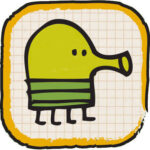
The Doodler, a small four-legged creature with a long nose, bounces automatically whenever he lands on a platform. Your job is to steer him by tilting the phone, so he lands on the next platform above instead of falling past it. The screen scrolls upward as he climbs, and if he drops below the bottom edge the run is over. Moving off one side of the screen brings him back on the other side, which is often the quickest route to a distant platform.
Tapping the screen fires a small shot upward, and on Android you can switch on an automatic aim mode so shots go toward the nearest monster. Gentle tilts work far better than sharp ones, because the Doodler keeps sideways speed and overshoots narrow platforms.
Platforms, Monsters And Black Holes In Doodle Jump
Not every platform can be trusted. Some slide from side to side, some break the moment you touch them, and others vanish after one bounce, so the higher you go, the more you have to read each step before landing. Monsters hover in the path and end the run if you hit them from the side or below, though jumping on their heads defeats them. UFOs abduct the Doodler if he passes under their beam, and black holes pull him in if he gets too close.
Power-Ups That Speed Up A Doodle Jump Run
Power-ups appear on platforms and change a run for a few seconds:
- Springs and trampolines give a much bigger bounce
- Propeller hats lift the Doodler steadily for a short time
- Jetpacks and rockets launch him a long way up
- Shields protect him from monsters for a moment
These are the fastest way to gain height, but they also carry you past hazards you cannot see yet, so landing after a jetpack ride needs quick attention.
What Is Doodle Jump Like After All These Updates
The hand-drawn graph paper look is the default, and Lima Sky added many themes over the years. They include Christmas, Halloween, Rainforest, Space, Soccer World Cup, Underwater, Easter, Ice Blizzard, Retro Arcade, Ninja and Pirate, each with its own monsters and platform styles. By December 2011 the game had sold 10 million copies across iTunes and Google Play, and critics were broadly positive, with Pocket Gamer praising how quickly anyone could pick it up and keep coming back. A sequel, Doodle Jump 2, came to the App Store in December 2020.
Doodle Jump On Android In 2026
The game is live on Google Play from Lima Sky LLC and free to install, with ads and in-app purchases. It still receives updates and installs on current phones without problems, since its graphics are light. Tilt controls work best when you hold the phone upright, and many players find they become awkward when lying down. It suits anyone who likes short score-chasing sessions and is a good first game for children, as there is no text to read and the controls make sense within seconds.
Key Features
- Tilt controls that steer the Doodler left and right
- Tap to shoot, with an automatic aim option on Android
- Endless climb with platforms that move, break or vanish
- Monsters, UFOs and black holes that end a run
- Propeller hats, jetpacks, rockets, springs and trampolines
- Shields that make the Doodler briefly invulnerable
- Themes such as Christmas, Halloween, Space, Underwater and Pirate
- Hand-drawn graph paper art style
Our Take On Doodle Jump
What We Like
- Simple to learn with real skill in the long run
- Tilt control feels natural on a phone
- Many themes keep the look fresh
- Short runs suit quick breaks
What Could Be Better
- Free version contains ads and in-app purchases
- Tilt control can be awkward when lying down
- Little has changed since its early years
What's New In 3.11.40
We stomped a few annoying pests
Download Safety
- Official source You get it from the official store listing.
- No changes made You install the developer's own build, nothing in between.
- Checked for updates Last checked 3 weeks ago.
Questions People Ask About Doodle Jump
01 How do you control Doodle Jump?
You tilt the phone to move the Doodler left and right while he bounces automatically, and tap the screen to shoot upward.
02 What ends a run in Doodle Jump?
Falling below the screen, touching a monster, getting pulled into a black hole or being abducted by a UFO all end the run.
03 Which themes does Doodle Jump have?
Themes include the original, Christmas, Halloween, Rainforest, Space, Soccer, Underwater, Easter, Ice Blizzard, Retro Arcade, Ninja and Pirate.
04 Is there a Doodle Jump 2?
Yes. Doodle Jump 2 was released on the App Store in December 2020.
05 Is Doodle Jump free to download?
Yes. Doodle Jump is free to download and install.
06 What is the latest version of Doodle Jump?
The latest version is 3.11.40, updated on August 23, 2026. This page is checked for new builds, so the Install New Version button always points to the newest one.
07 Is it safe to install Doodle Jump from here?
Yes. The button opens the official store listing, so you install it the normal way and get automatic updates.
08 Which Android version does Doodle Jump need?
Doodle Jump works on Android 7.0 and up. Phones on an older Android version cannot install it.
How To Install Doodle Jump
- Tap the install button. The official store page opens.
- Tap Install and wait for it to finish.
- Open the app from your home screen.
All apps are the property and trademark of their developers. Downloads are served from the official source shown on each page. We do not host modified or cracked files.