

Draw my Path Obby
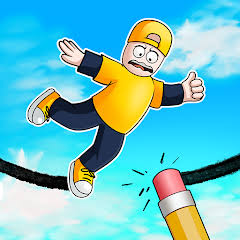
Draw my Path Obby is a multiplayer puzzle-platform game from emolingo games where you draw your own paths across gaps and obstacles. Use the pen and eraser to create workable routes, jump through colourful parkour stages and race other players toward the finish on desktop, phone and tablet.
Draw my Path Obby is a multiplayer puzzle-platform game from emolingo games where you do more than jump across an obstacle course. You can draw your own paths over gaps and hazards, erase bad lines, and race other players toward the finish. That drawing mechanic makes each stage less about finding one fixed route and more about creating a workable solution quickly. I find drawing short, controlled platforms more reliable than one huge line because small corrections are easier when the route changes.
| Game Detail | Information |
|---|---|
| Game | Draw my Path Obby |
| Developer | emolingo games |
| Genre | Puzzle, Obby |
| Gameplay Style | Drawing paths, platforming, parkour and multiplayer racing |
| Controls | A/D or Arrow Keys, W/Up/Space, Mouse, Q, E, R |
| Supported Devices | Desktop, phone and tablet |
| Release Date | March 2025 |
| Latest Update | April 2026 |
| Rating | 4.0 |
| Votes | 65K+ |
| Multiplayer | Online multiplayer |
About Draw my Path Obby
Draw my Path Obby combines an obstacle course with a drawing puzzle.
Instead of relying only on existing platforms, you can use a virtual pencil to sketch new surfaces across dangerous gaps. Those drawings become part of your route, letting you create different ways through the same section.
The game also includes online multiplayer, so reaching the finish quickly matters when other players are completing the same challenge.
Latest Draw my Path Obby Update
The current Poki edition lists March 2025 as the original browser release and April 2026 as the latest update.
As of September 2026, the current listing shows a 4.0 rating from more than 65,000 votes and confirms support for desktop, phone and tablet.
Draw my Path Obby Gameplay
Each stage gives you a platform layout containing gaps and obstacles.
You move your character through the course while using the drawing tool whenever the existing path is incomplete. The goal is to build enough of a route to keep moving and cross the finish before your opponents.
Controls
- A / Left Arrow: Move left
- D / Right Arrow: Move right
- W / Up Arrow / Spacebar: Jump
- Mouse: Draw your path
- Q: Select pen
- E: Select eraser
- R: Remove all drawings
- Escape: Pause
These are the controls documented for the current version.
The W3C Pointer Events specification provides useful technical background on mouse and touch-style input in modern browser applications.
Drawing Your Own Path
Drawing is the feature that separates Draw my Path Obby from a normal platform game.
When a gap blocks the route, you can sketch a line that functions as a temporary platform. The shape does not need to follow one predetermined solution, so different players can approach the same obstacle differently.
I find drawing slightly beyond the landing edge useful because it gives the character more room to recover from an imperfect jump.
Using The Pen
Pressing Q selects the pen tool.
Once active, the mouse can be used to sketch the path you want your character to cross.
Short lines are usually easier to control because you can build the route section by section instead of committing to one large shape.
Using The Eraser
Press E to switch to the eraser.
This lets you correct part of a drawing instead of clearing everything and beginning again.
That becomes useful when most of your platform works but one section creates an awkward angle.
Removing All Drawings
Pressing R removes all of your current drawings.
I would use this when the route has become too cluttered to repair efficiently. Starting again with a simpler shape can be faster than trying to fix several overlapping lines.
Platforming And Jumping
Drawing does not remove the need for platforming.
You still need to control movement and jump timing after building the route. That means a technically valid drawing can still be difficult to use if the platform is too steep, narrow or awkwardly positioned.
The strongest solutions usually consider both sides of the problem:
Can I draw a path here, and can my character actually cross it comfortably?
Multiplayer Races
Draw my Path Obby supports online multiplayer.
Poki describes it as a multiplayer parkour game where players compete in shared lobbies and try to reach the finish by combining quick movement with fast drawing.
That changes the pace compared with a purely solo puzzle because spending too long creating a perfect route can let another player finish first.
Draw my Path Obby Strategy
A practical approach is:
- Look at the gap before drawing.
- Identify where you want to land.
- Sketch the shortest useful path.
- Check its angle.
- Cross it carefully.
- Erase or redraw only when necessary.
The mistake I would avoid is drawing continuously without considering how the character will move across the finished line.
Short Paths Versus Long Paths
Long drawings can cover more distance at once, but they can also create awkward slopes.
Shorter platforms give you more control over individual sections.
I find building two or three simple surfaces more predictable than trying to draw one complicated bridge across an entire obstacle.
Creating Your Own Solution
There is not always one correct path.
Poki explicitly encourages players to use their imagination and create their own solution to the platform layouts.
That gives the puzzle system some replay value because a stage can potentially be cleared with different drawings.
Draw my Path Obby Difficulty
The difficulty comes from combining several tasks:
- Reading the obstacle layout
- Drawing quickly
- Creating usable platforms
- Jumping accurately
- Correcting poor lines
- Racing other players
- Reaching the finish first
The controls remain relatively simple even when the combination of drawing and movement becomes more demanding.
Draw my Path Obby Progression
Progress mainly comes from:
- Clearing obstacle sections
- Improving drawing speed
- Building cleaner routes
- Timing jumps better
- Correcting mistakes efficiently
- Competing in multiplayer races
- Reaching finish lines before opponents
There is no complicated equipment system required to understand the core game.
Who Created Draw my Path Obby?
Draw my Path Obby was created by emolingo games.
The current Poki listing also connects the developer with:
- Car Machines
- Disaster Arena
- Escape From School
- Rainbow Obby
- Sword Masters
For another game from the same developer, Disaster Arena uses changing competitive minigames instead of player-drawn platforms.
Browser And Platforms
Draw my Path Obby supports:
- Desktop
- Phone
- Tablet
Poki confirms all three device categories.
The game’s combination of movement and drawing has been adapted for both computer and mobile play.
Can You Play With Friends?
Yes.
The current developer listing confirms that Draw my Path Obby is a multiplayer game and can be played online with friends.
That makes it different from many obby games that are built entirely around solo progression.
Games Like Draw my Path Obby
emolingo games has created several related browser titles, including:
- Rainbow Obby
- Disaster Arena
- Escape From School
- Sword Masters
- Car Machines
- Escape From Spider
The current Poki developer listings connect these titles with the same studio.
For a different competitive platform challenge, Disaster Arena replaces drawing with rotating minigames and movement challenges.
About This Game
Draw my Path Obby works because the player can change the platform layout instead of only reacting to it.
The pen, eraser and clear-all tools let you build and revise your own route, while the movement controls still require good platforming once the drawing is complete. Multiplayer racing adds another layer because a clever route is most useful when you can create it quickly.
The March 2025 release received an update in April 2026 and remains available across desktop, phone and tablet.
Related Categories
Draw my Path Obby fits naturally into:
- Puzzle Games
- Obby Games
- Platform Games
- Multiplayer Games
- Parkour Games
- Drawing Games
- Skill Games
- Mobile Games
Poki currently categorizes it primarily as a Puzzle Game, while localized listings also place it within the Obby category.
More Games From This Developer
emolingo games is also credited with:
- Rainbow Obby
- Disaster Arena
- Escape From School
- Escape From Spider
- Sword Masters
- Car Machines
These titles appear across the studio’s current Poki catalogue.
Get The Game
Draw my Path Obby runs directly through supported desktop and mobile browsers.
Use the movement controls to navigate each course, draw platforms with the mouse when gaps block your route, erase mistakes when necessary and race toward the finish alongside other players.






Related products


Minecraft
-
Open-Ended Gameplay: Create, explore, and play without limits.
-
Innovative Mechanics: Craft blocks, tools, redstone circuits, and more.
-
Adventure & Combat: Survive mobs, explore the Nether, and defeat the Ender Dragon.
-
Community & Multiplayer: Join servers, collaborate, and showcase creativity worldwide.
Reviews
There are no reviews yet.