

1010 Puzzle Game Classic Web
The classic 10 by 10 block puzzle from Gram Games, played on the web. Place three shapes per turn, clear full rows and columns, and keep space open as long as you can.
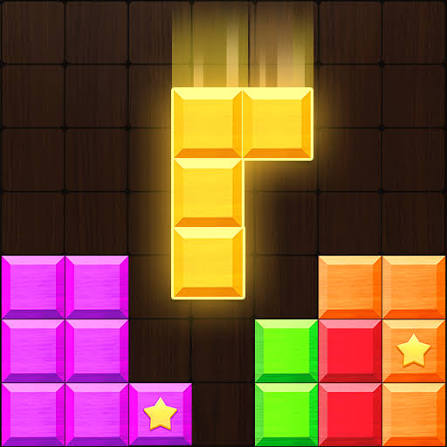
Long before block puzzles filled every app store chart, there was a plain wooden-looking grid with ten rows and ten columns. 1010 Puzzle Game Classic Web brings that original idea to a browser tab: Gram Games’ 1010!, the 2014 mobile hit where three shapes at a time go onto the board. Complete a row or column and it clears. There is no clock and no rotation, so every loss comes down to space you did not plan for.
| Game Detail | Information |
|---|---|
| Game | 1010! Block Puzzle Game |
| Developer | Gram Games |
| Genre | Block puzzle, logic |
| Gameplay | Fit three shapes per turn onto a 10×10 board and clear complete lines |
| Controls | Drag and drop with a mouse, touchpad or finger |
| Supported Devices | Web browsers on PC, Mac and Chromebook, plus Android and iOS |
| Release | 2014 on mobile |
| Multiplayer | No, single player |
| Main Goal | Keep the board playable and beat your best score |
| Android App | Yes – official |
What Classic Means In 1010
The classic way to play is the one the game launched with: one endless board, three shapes per turn and a score that only stops when you run out of room. There are no lives, no levels and no power-ups to save you. Many newer block games add boosters, missions or themed stages, but the classic version keeps nothing between you and the grid.
That simplicity is the appeal. Every run starts the same way, so improvement comes only from better decisions, not from unlocking anything.
The Shapes You Will See
Pieces range from a single cell to straight lines up to five long, L shapes in small and large sizes, and squares up to 3 by 3. They arrive in a tray of three, and you can place them in any order. Only after all three are down does a new tray appear.
Drag Controls On Web And Phone
- Grab: press on a shape in the tray
- Move: drag it over the board until the outline sits where you want it
- Drop: release to place it; if it does not fit, it returns to the tray
On a laptop touchpad, slow, deliberate drags help prevent pieces landing one cell to the side.
Shape Planning Tips For Longer Classic Runs
- Avoid one cell wide channels. A narrow gap one cell wide can only be filled by single cells or straight lines, and those may not come in time.
- Finish nearly full lines before starting new ones. A row with eight or nine cells filled is close to free space, so complete it.
- Build in blocks of two. Stacking pieces into two cell thick strips keeps edges flat and easy to fill.
- Watch diagonal holes. Gaps that touch only at corners are hard for any shape to reach.
- Pause when two big shapes arrive together. Place the one that needs the rarer space first, often the long line.
Thinking In Rows And Columns At Once
The board clears both rows and columns, so the same cell can count twice. A piece placed where an almost full row crosses an almost full column can clear both together. Spotting those crossing points is the habit that separates average scores from great ones. A quick way to train it is to scan the board after every drop and name the two or three cells that would finish the most lines.
How The Web Version Keeps Your Best Score
Browser games usually store your best score with web storage, a small save space each site gets inside your browser. MDN explains how this works in its Web Storage API guide. In practice, your score stays as long as you use the same browser on the same device. Clearing site data, using a private window or switching computers starts you from zero. The official app keeps its own record on your phone.
Playing 1010 On A Chromebook Or Old Laptop
A block puzzle is light work for any computer, so web versions run smoothly even on older school Chromebooks. Nothing gets installed, and the game works in Chrome, Edge, Firefox and Safari. If you play on a school or work network, follow its rules about games, and stick to trusted game sites rather than unknown mirrors full of pop-ups.
Gram Games And The Original 1010!
1010! was made by Gram Games and released on mobile in 2014. It became one of the defining hits of the block puzzle wave, and its three-piece, place-and-clear formula shows up in many later games, including Block Blast. Gram Games later became part of Zynga, and the official 1010! app is still free on Google Play and the App Store.
Why The 10 By 10 Grid Still Works
A ten cell line takes longer to complete than shorter grids, which gives you room to plan but also more chances to leave holes. That balance is why the classic board has lasted. Beginners get time to learn, while experienced players can chase very long runs where the board never gets more than half full. It also means a single sloppy turn rarely ends the game at once, so you usually get a chance to repair a mistake if you notice it early.
Games Like 1010!
Block Blast Online Free No Download plays with the same three-piece rules on a smaller 8 by 8 board, so it feels faster and tighter. Tetris Classic Chromebook Unblocked is the original falling block line clearer. For number based logic, try 2048 Cupcakes Extended Unblocked At School.
1010! FAQ
Is 1010 Classic Different From Block Blast?
The rules are similar, but 1010! uses a 10 by 10 board while Block Blast uses an 8 by 8 board.
Can You Play 1010 On The Web Without An Account?
Browser versions usually load without an account, but your score saves only in that browser.
Does 1010! Have Levels?
The classic game has no levels. It is one endless board that ends when no piece fits.
Related Categories
- Puzzle Games
- Logic Games
- Brain Games
- Block Games
About This Game
1010! is block puzzling at its simplest: a square board, three shapes and your own judgement.
Close up narrow gaps, finish lines that are nearly done and look for the cells where rows and columns cross.






Related products




Reviews
There are no reviews yet.