

Line Rider Unblocked Chromebook
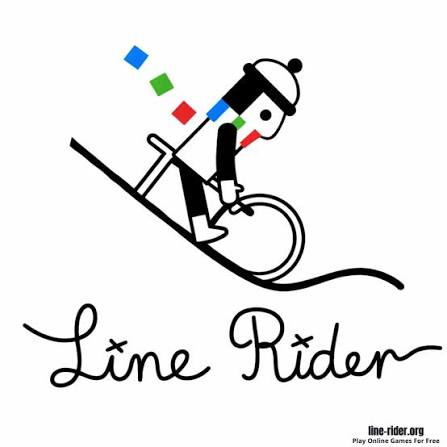
Line Rider is a browser drawing toy where you sketch a slope and watch a sledder named Bosh ride it with real physics. It runs in Chrome on a Chromebook with nothing to install.
A school Chromebook and a pencil tool are all you need for Line Rider Unblocked Chromebook, the browser version of the famous sled drawing toy. You sketch a slope, press play, and a small rider named Bosh slides down it while gravity and momentum take over. Nothing tells you what to build, and nothing gives you points. The challenge comes from your own lines, because a bump you did not notice can launch Bosh off his sled halfway through a ride.
| Game Detail | Information |
|---|---|
| Game | Line Rider |
| Developer | Boštjan Čadež, with inXile Entertainment on Line Rider 2: Unbound |
| Genre | Physics drawing sandbox |
| Gameplay | Sketch a slope, press play and watch Bosh sled down whatever you drew |
| Controls | Touchpad, mouse or touchscreen to draw, toolbar to play, stop, erase and zoom |
| Supported Devices | Chromebook and desktop browsers, iOS |
| Release | September 23, 2006 (original Flash version) |
| Multiplayer | No, single player, though finished tracks are shared online |
| Main Goal | Design a ride that keeps Bosh on his sled to the end |
| Android App | No official app |
Why Line Rider Runs Fine On A Chromebook
Chromebooks cannot install normal Windows programs, so games that need a download are out. Line Rider avoids that problem because its modern web version, released in 2015, is written in JavaScript and runs inside an ordinary Chrome tab. The first Line Rider was a Flash toy, and Flash stopped working in every major browser after December 31, 2020, so the JavaScript build is the reason the game still opens today.
There is nothing to install, so a locked school laptop can still run it. That is the honest meaning of “unblocked” here: a browser game that opens without setup. Whether you may open game sites on a school network is a separate question, and the answer comes from your school’s rules, not from the game. If a site is blocked, play at home instead of trying to get around the filter.
Drawing Smooth Lines With A Touchpad Or Touchscreen
Most Chromebooks come with a touchpad, and touchpads make shaky lines. Shaky lines are a real problem in Line Rider, because every tiny wobble acts like a bump at speed. A few habits help a lot:
- Use the straight line tool for ramps: click a start point and an end point, and the game draws a perfectly flat slope with no wobble.
- Zoom in before drawing curves: short strokes at a high zoom level come out smoother than one long stroke.
- Try the touchscreen if you have one: many school Chromebooks fold into tablets, and a finger or stylus gives smoother curves than a touchpad.
- Plug in a USB mouse if allowed: it is the single biggest upgrade for drawing control.
The Three Line Colors And When To Reach For Each
Line Rider gives you three kinds of line. Blue is the normal riding surface. Red is an accelerator that pushes Bosh along in the direction you drew it, so a red line drawn backward will shove him the wrong way. Green is scenery, so Bosh passes straight through it, which makes it perfect for trees, buildings and drawings that should not change the ride.
A good rule is to build the whole ride in blue first, then add red only where Bosh is too slow to clear a gap. Decorating with green comes last, once the ride works.
Track Shapes That Keep Bosh On The Sled
Line Rider tracks are built from a few repeating shapes. Learning how each one behaves saves hours of trial and error.
The Kicker
A short upward curve at the end of a slope throws Bosh into the air. The steeper the curve, the higher he goes, but a very sharp kicker can twist him off the sled. Gentle kickers make cleaner jumps.
The Landing Ramp
Bosh must come down on a slope that matches his falling angle. If he lands on flat ground from a big height, the impact knocks him off. Draw the landing long and steep at the top, then flatten it out slowly.
The Quarter Pipe
A curve that goes up and bends back sends Bosh up, then back down the way he came. It is a handy way to turn him around without a loop.
Saving Tracks On A School Chromebook
Losing a two hour track is the worst feeling in Line Rider, and Chromebooks make it easier than you might think. Browser games keep their data in the browser’s storage for that site. If you play in Guest mode, Chrome deletes that data when you sign out. Some schools also clear browsing data automatically.
- Use the save or export option if your version has one, and keep the file somewhere you control.
- Stay signed in to your own Chrome profile rather than Guest mode while you build.
- Take a screenshot of tricky sections so you can rebuild them if the save is lost.
Where Line Rider Came From
Boštjan Čadež, a Slovenian student, posted the first Line Rider on DeviantArt on September 23, 2006. Within months people were sharing long rides set to music, and the toy became one of the best known web creations of its time. inXile Entertainment later published Line Rider 2: Unbound in 2008 for Nintendo DS, Wii and Windows. The Line Rider article on Wikipedia lists the full release history.
Is There A Line Rider App For Android Chromebooks?
Many Chromebooks can run Android apps from Google Play, so it is fair to ask. No official Line Rider app for Android could be verified, and Play Store listings that use the name come from other makers. Line Rider is listed on the iOS App Store for iPhone and iPad. On a Chromebook, the browser version is the one to use. If you want a genuine physics game with a level editor from Google Play, Happy Wheels by Fancy Force is linked from this page.
Games Like Line Rider
Try these if you like watching physics decide the result:
- Pull the Pin Puzzle Full Screen Free: pull pins in the right order so balls fall where they should.
- Sand Balls Classic Web Version Unblocked: carve paths through sand and guide balls down to the truck.
- Drive Mad 2 Secret Levels: a physics driving game where awkward vehicles meet awkward terrain.
Line Rider FAQ
Can You Play Line Rider On A Chromebook Without Installing Anything?
Yes. The web version runs in Chrome, so there is no file to download or install.
Why Does Bosh Fall Off The Sled?
He falls off when he hits something too hard, such as a flat landing from a big drop or a sharp corner at high speed. Longer, smoother curves fix most crashes.
Does Line Rider Have Levels?
No. It is a sandbox, so you set your own goal, such as a ride that lasts a full minute or one that matches a song.
Related Categories
- Physics Games
- Drawing Games
- Casual Games
- Chromebook Games
About This Game
Line Rider proves that a pencil, a slope and gravity can keep people busy for years. It works on a Chromebook because it lives entirely in the browser.
Draw a short hill today, save it, and add one new jump at a time. A long ride is just a lot of small fixes stacked together.






Related products

Among Us
-
Players: 4–15 online or local WiFi players.
-
Role Gameplay: Crew must complete tasks; Impostors secretly sabotage and eliminate.
-
Cross-Platform Play: Play on Android, iOS, PC, and consoles.
-
Party Game Fun: Best played with friends using voice chat for maximum strategy and deception.
-
Genres: Strategy, Indie, Action, Survival, Stealth, Party.
Dragon Simulator 3D

EA Sports FC 26
Step onto the pitch with EA Sports FC 26, the ultimate football simulation game where strategy, skill, and excitement meet!
Take control of your club, play your way, and experience a fully overhauled gameplay experience inspired by community feedback.
EA Sports FC 26 allows players to manage and control every aspect of their football club. With new Manager Live Challenges,
dynamic storylines, and player Archetypes inspired by the greats of the game, every match is full of strategy, skill, and thrilling moments. Build your team, develop tactics, and dominate the pitch.

Warframe
-
Genre: Shooter, RPG, Adventure Game, Action
-
Gameplay: Fast-paced combat, explore solar system, complete missions & raids
-
Customization: Upgrade and master different Warframes with unique powers
-
Objective: Overthrow the Grineer Empire and protect the solar system
-
Replayability: Endless missions, cooperative raids, frequent updates, and events
Reviews
There are no reviews yet.