
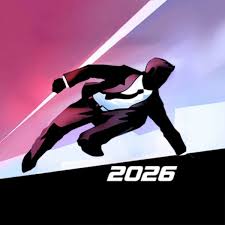


Vector Browser Game Full Screen
Vector is Nekki’s parkour runner where you time jumps and slides to escape a security hunter. Full screen gives you a bigger view of each obstacle and more time to react.
Playing Vector Browser Game Full Screen means giving the rooftop chase the whole monitor, and in a game decided by split-second timing that makes a real difference. Vector is the parkour runner from Nekki where a free runner escapes a grey city with a security hunter close behind. The runner sprints on his own, so your fingers only handle the moves: jumping, vaulting, sliding and climbing at exactly the right moment. One late press and the hunter tackles you, which sends you straight back to the start of the level.
| Game Detail | Information |
|---|---|
| Game | Vector |
| Developer | Nekki |
| Genre | Side-scrolling parkour runner |
| Gameplay | Your runner moves on his own while you time jumps, slides and tricks to stay ahead of a hunter |
| Controls | Up and Down arrow keys in the browser, swipes on phones |
| Supported Devices | Desktop and Chromebook browsers, Android, iOS |
| Release | 2012 |
| Multiplayer | No, single player |
| Main Goal | Finish each level without getting caught, and collect bonuses and tricks for a better rating |
| Android App | Yes – official |
Why Full Screen Helps In A Timing Game
Vector shows obstacles coming from the right side of the screen. In a small embedded window, a wall or a gap appears late and looks tiny, so you have less time to read it. In full screen, the same obstacle is bigger and easier to judge, and the movement looks smoother because nothing else on the page competes for your eyes.
A bigger view gives you a fraction of a second more warning, and in Vector that is often the gap between a clean vault and a tackle. Full screen also hides browser tabs and notifications that pull attention away mid-run.
How To Switch To Full Screen
- Game Button: many web versions show a full-screen icon near the game window, usually a square with arrows.
- F11 On Windows: puts the whole browser into full screen. Press it again to leave.
- Full Screen Key On A Chromebook: the key in the top row with a rectangle icon does the same job.
- Escape: exits full screen in most browsers.
If the picture looks stretched or has black bars at the sides, that is normal. The game keeps its shape so the level does not get distorted.
The Two Keys That Run The Whole Game
Vector keeps its controls tiny, which is part of why it works so well in a browser:
- Up Arrow: jump, vault over low obstacles or climb tall walls
- Down Arrow: slide under pipes and barriers, or roll after a high drop
- Same Keys In Trick Zones: pressing them inside a marked trick area performs a stunt
- Swipe Up And Swipe Down: the same moves in the official phone app
Because there are only two inputs, the skill is all in timing, not in remembering buttons.
What Happens Inside A Level
Levels are side views of rooftops, offices and factory spaces. Obstacles come in sets, so a level feels like a rhythm you learn by heart. The hunter follows your exact path, and every stumble lets him close in. Get far enough ahead and he becomes a dot behind you, but a few small mistakes in a row bring him right back.
Bonus items are scattered on high and low routes. Collecting them adds to your score, and your final rating for the level depends on bonuses picked up and tricks completed.
Tricks Are Earned, Not Given
New tricks are unlocked as you progress through the game. Once you own one, it can be performed in matching trick zones. Tricks add points but take a moment to finish, so a trick at the wrong time hands the hunter free ground. Knowing when to skip a trick is a skill on its own.
Practical Tips For Cleaner Runs
- Learn each level in short pieces. Restart after a mistake in the first section instead of playing on with the hunter breathing down your neck.
- Rest your fingers on both arrow keys before the level starts. Moving your hand mid-run is the most common cause of a late press.
- Collect the bonuses on the safer low route first, then come back for the high route once you know the level.
- When a trick zone sits right before a hard obstacle, skip the trick the first few times.
- If your runs feel inconsistent, turn on the sound. The footsteps help you feel the rhythm of the level.
Getting Smooth Frames In The Browser
Full screen only helps if the game runs smoothly. A choppy frame at the wrong moment feels like your key did not register. Close other tabs, especially videos, and keep hardware acceleration turned on in Chrome under Settings, then System. On older laptops, plugging in the charger stops power saving from slowing the browser down.
Nekki And The Story Of Vector
Vector was made by Nekki, the studio that also created the Shadow Fight games. It came out in 2012 and stood out for its fluid, motion-captured style of running. The game spread on phones and on web game sites at the same time. Nekki later released Vector 2 with gear and upgrade systems, which Droid Gamers covered when it reached Google Play. On iOS, the first game now appears as Vector Classic.
Browser Game Or The Official App
The browser version opens with no download and runs in Chrome, Edge, Firefox or Safari, including on Chromebooks. It is ideal for a few quick levels. Modern web copies run on HTML5, so they do not need Flash, which stopped working after December 31, 2020. On a school or work device, only play where the network rules allow games.
The official Android app from Nekki is the fuller package, with touch controls built for swipes and progress saved on your phone. Browser progress, on the other hand, lives in your browser storage and is lost if you clear site data.
Games Like Vector
More reaction games to try on the site:
- G-Switch 4 Unblocked Free: an auto-runner where one button flips gravity.
- Space Waves Neon Platformer Unblocked 66: steer a wave through narrow neon gaps.
- Moto X3M Spooky Land HTML5: stunt bike levels where landing angles decide your time.
Vector FAQ
Does Vector Work In Full Screen On A Chromebook?
Yes. Use the game’s full-screen button if it has one, or the full screen key in the Chromebook’s top row.
Why Does The Hunter Keep Catching Me?
Every bump, late jump or mistimed trick slows your runner. Clean runs with fewer tricks keep you further ahead.
Is Vector 2 Different From Vector?
Yes. Vector 2 adds gear and upgrades on top of the same parkour idea.
Related Categories
- Platform Games
- Skill Games
- Running Games
- Action Games
About This Game
Vector is a short, sharp test of timing, and full screen turns it into the clearest version of itself.
Learn each level piece by piece, keep your fingers ready, and let the hunter watch you vanish over the next rooftop.






Related products


Call of Duty
-
Intense Combat: Fast-paced FPS action with realistic weaponry and tactics.
-
Story & Strategy: Engage in gripping campaigns and tactical multiplayer battles.
-
Cutting-Edge Technology: Advanced gear, weapons, and gameplay mechanics.
-
Live Multiplayer: Competitive matches and co-op gameplay for endless action.

ROBLOX
From role-playing and adventure games to simulations and action-packed challenges, Roblox provides a variety of genres to explore.
Players can socialize, collaborate, compete, and even create custom events in these user-generated worlds. Every session is unique and driven by player creativity.
Watch Roblox live now and join thousands of viewers exploring games and worlds created by the Roblox community. Share experiences, discover new worlds, and enjoy interactive gameplay in real time.

Reviews
There are no reviews yet.