
Moto Road Rash 3D Unblocked School
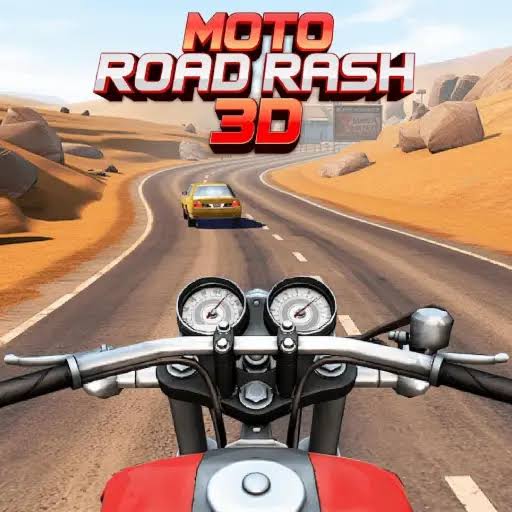
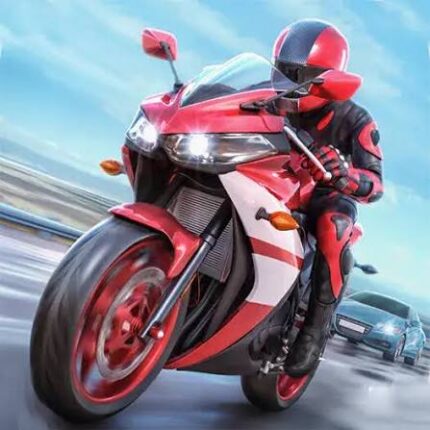
Moto Road Rash 3D is a free 3D motorbike game for the browser where you ride through a city across four modes, Career, Endless, Time Trial and Free Ride, using just the arrow keys.
Anyone looking up Moto Road Rash 3D Unblocked School is usually after a bike game that opens in Chrome on a school Chromebook without an install. Moto Road Rash 3D is exactly that kind of game: a WebGL motorbike ride through a 3D city with four modes and arrow key controls. You lean through traffic and corners, hit level targets in Career, or just ride around. It looks relaxed until you try a sharp bend at full throttle and watch the rider slide down the road.
| Game Detail | Information |
|---|---|
| Game | Moto Road Rash 3D |
| Developer | Not credited on the main portals |
| Genre | 3D motorbike riding and racing |
| Gameplay | Ride a bike through a city across Career, Endless, Time Trial and Free Ride modes |
| Controls | Arrow keys only |
| Supported Devices | Desktop, laptop and Chromebook browsers |
| Multiplayer | No |
| Main Goal | Clear Career levels and open up more of the city |
| Android App | No official app |
Playing At School: What Is Fine And What Is Not
“Unblocked” in a search usually just means a browser game that needs no download and runs on a locked down device. Moto Road Rash 3D fits that, since it is a plain web page using WebGL graphics. Nothing gets installed on the Chromebook.
That does not make it allowed everywhere. Schools decide which sites can be used on their network and when. If the game is blocked, the block is there on purpose. Play during free time if your school permits it, or at home. This page does not cover ways around school filters, and trying them can get your device access taken away.
Which Mode Fits A Short Break
The four modes suit very different amounts of time, which is handy if you only have ten minutes.
Got Five Minutes: Time Trial
One route, one clock. A single attempt is short, and beating your own best time gives you a clear goal.
Got Ten Minutes: Endless
You ride until you crash. Runs can be over in seconds or last a long time, so it is easy to stop whenever you need to.
Got Longer: Career
Career is the main progression. Levels each have a target, and clearing them unlocks more of the city. It is the mode to save for a longer session.
Just Want To Ride: Free Ride
No targets at all. Good for learning the streets or just cruising.
A smart way to use your time is to spend one short break in Free Ride learning a part of the city, then use that knowledge in Career next time. Knowing where the tight corners and busy junctions are makes the level targets much easier to hit, because you are no longer reacting to surprises.
Four Keys, That Is All
- Up Arrow: throttle
- Down Arrow: brake
- Left Arrow: lean left
- Right Arrow: lean right
With so few inputs, the whole game is about timing. The listed controls have no handbrake, nitro or camera key to learn, which is why new players can start riding in seconds. When you brake and how hard you lean decide every corner.
Fixing The Mistakes New Riders Make
- Running wide on corners: you are braking too late. Brake while the bike is still upright, then lean.
- Clipping traffic: you are staring at the bike. Look further up the road so cars appear earlier.
- Wobbling on straights: you are holding the lean key too long. Tap it to make small corrections.
- Losing Time Trials by a second: you are braking for corners that do not need it. Ride the route once slowly and note which bends can be taken flat out.
- Short Endless runs: you are riding too fast too early. Build speed gradually, since the first crash ends the run.
The Name Comes From An Old EA Classic
Road Rash was a motorbike racing series by Electronic Arts that started in 1991, famous for punching rivals off their bikes. You can read its history on the Road Rash Wikipedia page. Moto Road Rash 3D borrows the name but is not an EA game. Portal descriptions focus on riding, modes and level targets, not on fighting, so treat it as a separate browser game about riding fast and clean.
Who Made Moto Road Rash 3D
The developer is not clearly credited on the main portals that host the game, and no official studio site could be confirmed. Several phone apps use similar names, but none can be tied to the same maker, so be careful with lookalike downloads.
Android Alternative
There is no confirmed official Android version. The Play button here goes to Moto X3M Bike Race Game by Ace Viral, a real and well known bike app. It is a 2D stunt game rather than a 3D city ride, but it is genuine.
Helping It Run On An Older Chromebook
School Chromebooks are often low powered, and a 3D city can stutter. A few steps help:
- Close every tab you do not need, especially video.
- Check that hardware acceleration is turned on in Chrome under Settings and System, if your school allows changing it.
- Use full screen so the browser is not drawing other page parts.
- Keep the charger plugged in, since some laptops slow down on battery.
Games Like Moto Road Rash 3D
For more bike games, try Super Bike Wild Race No Download for four-lap superbike races against computer riders, or Trial Bike Epic Stunts Unblocked for balance based obstacle courses. If you prefer cars in traffic, Highway Traffic Online No Ads is a good next pick.
Moto Road Rash 3D FAQ
Does Moto Road Rash 3D Need A Download?
No. It runs in your browser using WebGL, so nothing is installed.
Is This The Same Game As EA’s Road Rash?
No. It only shares part of the name. The game is about riding, braking and avoiding crashes in a 3D city.
Which Mode Unlocks New Areas?
Career mode. Clearing its levels opens up more of the city.
Related Categories
- Bike Games
- Racing Games
- Driving Games
- 3D Games
About This Game
Moto Road Rash 3D is a simple bike game with enough modes to fit any amount of free time. Four keys and a big city are all it needs.
Follow your school’s rules, pick the mode that fits your break, and brake before the bend, not in it.








Reviews
There are no reviews yet.