
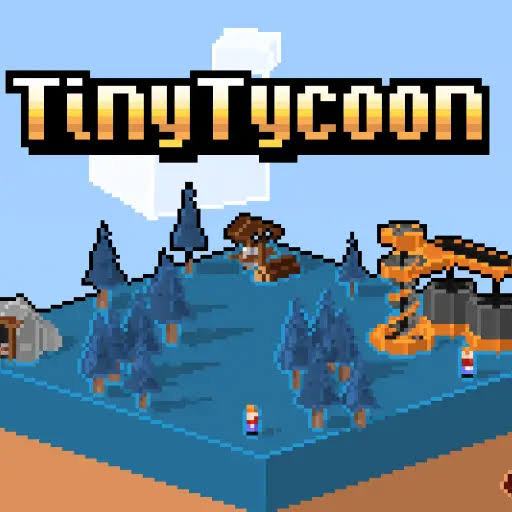


Tiny Tycoon 3D Web Free
Tiny Tycoon is a casual clicker where you gather resources by clicking and hire workers to collect them for you. Save up enough materials to build a rocket ship and launch it to a new world.
Click a rock, gather a resource, hire a worker, repeat: Tiny Tycoon 3D Web Free starts with that simple loop and slowly turns it into a small space program. Tiny Tycoon is a casual clicker where you collect materials by clicking them, then pay workers to gather them for you. The big goal on every map is to collect enough to build a rocket ship and launch it, which starts a new mission on a new world. The tricky part is deciding when to keep clicking and when to spend on workers.
| Game Detail | Information |
|---|---|
| Game | Tiny Tycoon |
| Developer | Doppler Creative (listed publisher on the Chrome Web Store) |
| Genre | Clicker, Idle, Casual |
| Gameplay | Click to gather resources, hire workers and build a rocket |
| Controls | Mouse click |
| Supported Devices | Chrome on desktop and Chromebook |
| Multiplayer | No, single player |
| Main Goal | Gather enough resources to build and launch a rocket ship |
| Android App | No official app |
From First Click To Rocket Launch
Each mission drops you on a small world with materials to collect. At the start, every resource comes from your own clicks. As soon as you can afford it, you hire workers who gather materials on their own. More workers means more resources per second, and that speed decides how fast you reach the rocket.
When the rocket is built, you launch it and begin a new mission. The worlds are generated by the game, so the next map is not just a copy of the last one. That keeps the early clicking part fresh each time.
How To Control Tiny Tycoon
- Left Mouse Click: click materials to gather them.
- Click Menu Buttons: hire workers and spend resources.
- Trackpad Tap: works as a click on a Chromebook.
When To Stop Clicking And Start Hiring
The classic clicker mistake is clicking for too long. Your hands get tired, and your income stays flat. A worker keeps gathering while you do something else, so the first few hires pay for themselves quickly.
Hire your first workers as early as you can afford them. Then use your own clicks to fill the gap on whatever resource is running short.
Tips For Faster Missions
- Check which material the rocket needs most and point your workers at it.
- Spend on workers before saving for big items. Steady income beats a slow pile.
- Use the stats screen to see which resource is holding you back.
- Do not ignore cheap materials. A small shortage can stall the whole build.
- On a new world, click hard for the first minute, then switch to managing.
Using The Stats Screen To Plan Each Mission
Tiny Tycoon keeps stats on your progress, and they are more useful than they look. In a clicker, it is easy to feel busy without knowing if you are moving forward. The numbers show you which resource is coming in fast and which is crawling.
Use them like a checklist. If one material is far behind the others, that is the one the rocket will be waiting on, so hire workers for it or spend your clicks there. If everything is coming in evenly, it is a good time to save up for the next big purchase. Checking the stats after each new hire also shows you if the hire was worth it, which helps you spend better on the next world.
Why Tiny Tycoon Works Well In Short Sessions
Each mission has a clear end point, the rocket launch, so the game splits naturally into small chunks. You can play one world, launch, and stop there without feeling like you left something half done. Because workers keep gathering while the game is open, you can also leave it running in a tab and check back now and then.
What The 3D In The Name Means
Tiny Tycoon uses a retro art style that mixes 2D and 3D looks, so it is not a full 3D world like a modern console game. It is light, colorful and easy to run. That simple style is part of why it loads quickly and works on basic laptops and Chromebooks.
Playing Tiny Tycoon Free On The Web
Tiny Tycoon is free and runs in the Chrome browser. Its Chrome Web Store listing also says it can work offline, which is handy on a laptop with weak Wi-Fi. Because it is built for the web, there is no Flash involved, and Flash games have not worked since December 31, 2020.
Your progress lives in your browser. Clearing site data or using a private window can reset your missions. If you play on a school or work computer, follow the rules of that network, and only add browser items your school allows.
Who Is Behind Tiny Tycoon
The Chrome Web Store lists Tiny Tycoon as offered by Doppler Creative. The listing does not give a release date, so none is claimed here. There is no official Android app of Tiny Tycoon. The Play Store link on this page goes to Capybara Clicker, a genuine idle clicker on Google Play, for players who want a similar tap-and-upgrade game on a phone.
Games Like Tiny Tycoon
If you enjoy clicking your way to bigger goals, Doge Miner 2 Back to the Moon Unblocked also ends with a trip to space. Cookie Clicker HTML5 School Unblocked is the best known clicker of all, and Capybara Clicker Unblocked Full Screen is a softer, cuter take on the same idea.
Tiny Tycoon FAQ
Is Tiny Tycoon Free?
Yes. It is a free game that runs in the Chrome browser.
Is Tiny Tycoon Really A 3D Game?
It uses a retro mix of 2D and 3D art rather than a full 3D world, which keeps it light on older computers.
What Happens After You Launch The Rocket?
The launch starts a new mission on a new world, where you build up your workers again.
Related Categories
- Clicker Games
- Idle Games
- Casual Games
- Tycoon Games
About This Game
Tiny Tycoon keeps the clicker idea short and clear: gather, hire, build, launch.
Each mission is a quick goal, and each new world is a fresh start.









Reviews
There are no reviews yet.