
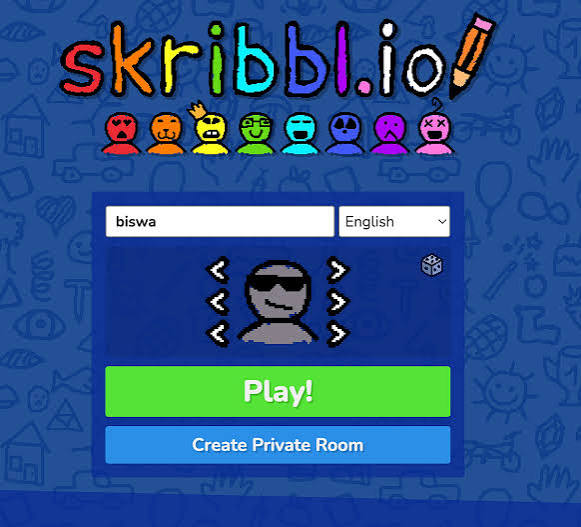


Skribbl io Private Lobby Free
Skribbl.io is a free browser drawing and guessing game. One player sketches a word while the others race to guess it in chat, and you can set up a free private lobby with custom words.
One player draws, everyone else guesses, and the fastest guess gets the most points. That is Skribbl io Private Lobby Free, the free browser drawing and guessing game skribbl.io played in a room made just for you and your friends. Each round, one player picks a word and sketches it with simple tools while the others type guesses into the chat. The fun comes from bad drawings, clever hints and the race to guess before the timer runs out.
| Game Detail | Information |
|---|---|
| Game | skribbl.io |
| Developer | Independent web developer (skribbl.io) |
| Genre | Drawing and guessing, word game, party game |
| Gameplay | Take turns drawing a word while others guess it in chat |
| Controls | Mouse or touch to draw, keyboard to guess |
| Supported Devices | Any modern browser on Chromebook, Windows, Mac, Android and iOS |
| Multiplayer | Yes, public rooms and free private lobbies |
| Main Goal | Score the most points by guessing fast and drawing clearly |
| Android App | No official app |
How A Round Of Skribbl.io Works
When it is your turn, the game shows you a few word choices. You pick one and start drawing on the shared canvas. Everyone else sees your drawing appear live and types guesses into the chat. Wrong guesses show up for all players, but a correct guess is hidden, so nobody can copy it.
Guessers earn more points the faster they get the word. The drawer earns points when other players guess correctly, so a clear drawing helps you too. After everyone has had a turn to draw, the round ends, and after the last round the player with the most points wins.
The scoreboard on the left updates after every turn, so you always know who is ahead. A close game often comes down to the last drawer, which keeps everyone paying attention until the very end.
Drawing And Guessing Controls
- Left Click and Drag: draw on the canvas
- Colour Palette: choose a colour
- Brush Size: switch between thin and thick lines
- Fill Bucket: fill an area with colour
- Eraser and Clear: fix mistakes or start over
- Enter: send your guess in the chat
On a phone or tablet, you draw with your finger and type guesses with the on-screen keyboard.
Setting Up A Private Lobby
Private rooms are free and built into the game. On the home screen, choose a name and avatar, then pick the option to create a private room. The game gives you an invite link to send to your friends, and only people with that link can join.
As the host, you can change settings before the game starts, such as:
- How many players can join
- The language of the word list
- How long each drawing turn lasts
- How many rounds you play
- How many word choices the drawer gets and how many hints show up
- Your own custom word list
Using Custom Words
Custom words are the best part of private lobbies. Type words separated by commas, like names of classmates’ pets, school subjects or in-jokes from your group. You can mix them with the normal words or set the game to use only your custom list. Keep words short and drawable, since long phrases are very hard to sketch in time.
Tips For Drawing So Others Guess Fast
- Start with the big shape first, then add details
- Draw the setting if the word is hard, for example waves around a boat
- Use colour on purpose: yellow for the sun, blue for water
- Point at the important part with an arrow if the drawing gets busy
Tips For Guessing Faster
Watch the hint line above the canvas. It shows how many letters the word has, and letters appear as time runs down. Guess related words quickly, since there is no penalty for wrong answers. If the drawer adds a second item, think of what links the two, because players often draw clues instead of the word itself.
Why Skribbl.io Works So Well In A Browser
Skribbl.io runs entirely in a web page. The drawing canvas uses the browser’s built-in drawing tools, explained on the MDN Canvas API page, so nothing needs to be installed. That makes it easy for a group to join from different devices, including Chromebooks, laptops and phones. You can start playing straight from the official skribbl.io site.
If you play at school or work, follow the rules of that network. Many teachers use drawing games for vocabulary practice, and a private room with custom words keeps things focused.
Keeping Your Lobby Friendly
Because public rooms have random players, the chat can get messy. A private lobby solves most of this, since only your invited friends can join. Players in a room can also vote to kick someone who is being rude. Never share personal details in the chat, even in private rooms.
Android And Mobile Play
There is no official skribbl.io app on Google Play. Apps in the store with a similar name are not made by the skribbl.io team, so check carefully before installing anything. The safe way to play on Android is to open skribbl.io in Chrome, which supports touch drawing.
Games Like Skribbl.io
If your group likes word games, try Words of Wonders Web Version Free for solo word puzzles. Wordle Unlimited Free Web Archive is a quick daily-style word guessing game. For a party game with more action, Agar io Private Server Browser has a free Party mode with codes.
Skribbl.io FAQ
Is A Private Lobby Free?
Yes, private rooms cost nothing. You only share the invite link with your friends.
Can You Add Your Own Words?
Yes, the host can add custom words in the room settings and even use only those words.
Does Skribbl.io Work On Phones?
Yes, it runs in mobile browsers, and you can draw with your finger.
Related Categories
- Word Games
- Multiplayer Games
- Casual Games
- Educational Games
About This Game
Skribbl.io is a simple, free drawing game that turns any group chat into a party. It needs no download, no account and no special device.
Make a private lobby, add a few custom words your friends will love, and keep your drawings big and simple.











Reviews
There are no reviews yet.