
How To Fix White Spots On A Phone Screen – Fixes That Work

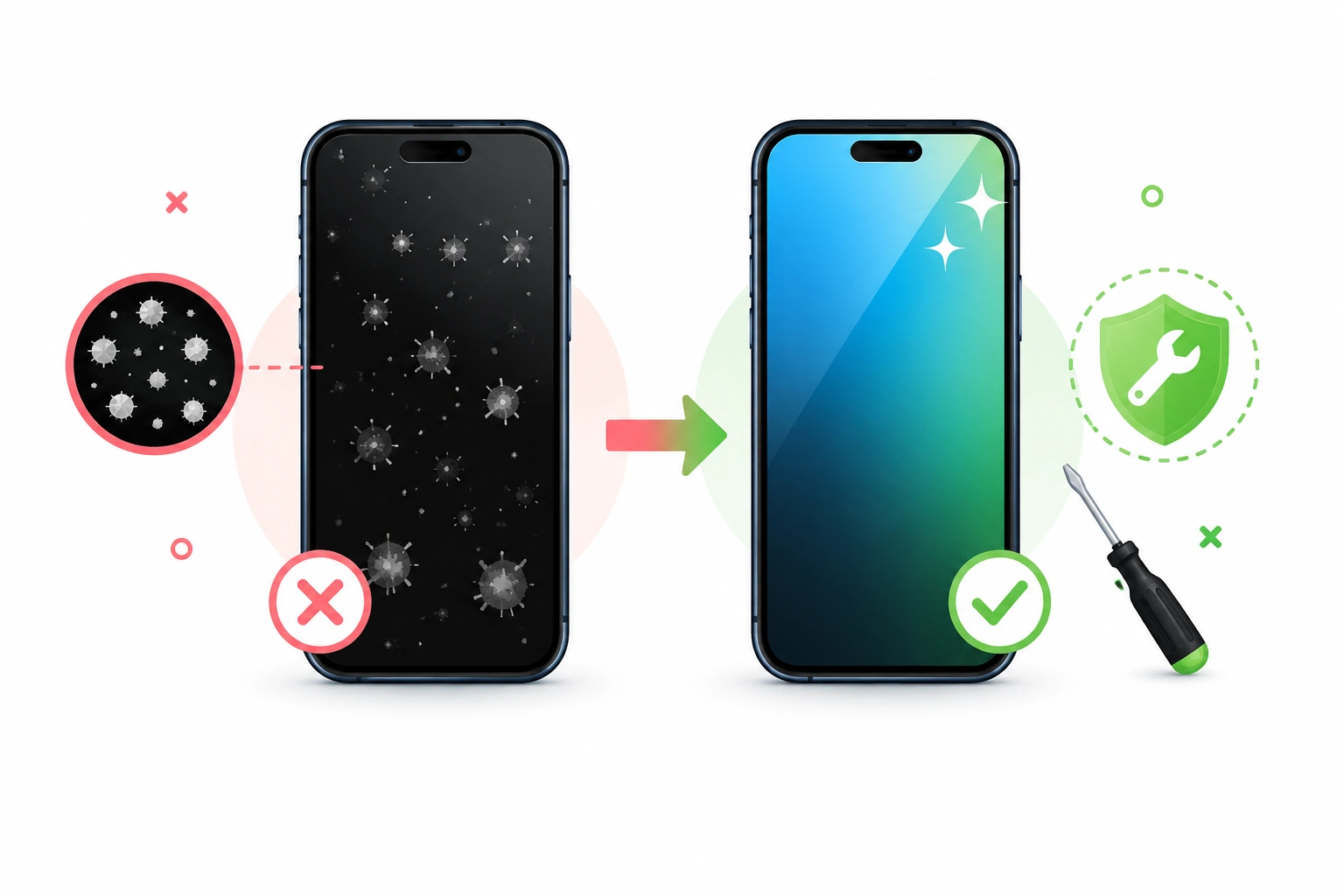
To fix white spots on a phone screen, first clean the glass with a microfiber cloth to rule out surface smudges or faulty screen protectors. If the mark survives cleaning, take a screenshot of the affected area and view it on another device, because a spot that shows up in the screenshot is a software or image problem while a spot that does not appear is physical damage inside the display stack. From there the fix depends on the cause: reseat or remove a lifting screen protector, stop the pressure source such as a back pocket or an over tight case, let a heat affected or moisture affected phone rest at room temperature with airflow for a full day, and treat a small bright dot as a possible stuck pixel rather than a broken panel. If the mark is spreading, growing brighter, or shaped like a ring or a starburst, the internal layers have been damaged and a screen replacement is the only real repair. Most white spots that people panic about turn out to be one of the first three causes, which cost nothing to fix.
| Symptom You See | Most Likely Cause | Realistic Outcome |
|---|---|---|
| Faint haze that wipes partly away | Skin oil, cleaning product residue | Fixed in two minutes |
| White patch along an edge or corner | Screen protector adhesive lifting | Fixed by reseating or replacing the protector |
| Bright blotch with soft edges | Pressure on the panel | Often fades over days on LCD, permanent on OLED |
| Cloudy milky area after a wet day | Moisture between layers | Sometimes clears with slow drying |
| Tiny sharp dot, always the same place | Stuck or dead pixel | Sometimes recoverable, often cosmetic |
| Ring, starburst or spreading pale mark | Internal layer damage | Screen replacement |
What A White Spot Is Actually Telling You
A phone screen is not one sheet of glass. It is a stack of thin layers pressed together, and a white spot is almost always light escaping from a place it should not, or two layers losing contact with each other. On an LCD phone the stack includes a backlight at the bottom, a light guide plate, diffuser sheets that spread the light evenly, the liquid crystal layer, a polarizer, adhesive, and then the glass you touch. On an OLED phone there is no backlight because each pixel makes its own light, so the causes of a pale mark are different and usually more serious.
Knowing which layer is involved tells you whether a fix is even possible. This is the mapping I use before touching anything.
| Where The Fault Sits | How It Looks | Can You Fix It At Home |
|---|---|---|
| On top of the glass | Wipes or smears when you clean | Yes |
| Between protector and glass | Sharp edged patch, often with a rainbow tint | Yes |
| Adhesive between glass and panel | Milky cloud, changes with viewing angle | Sometimes |
| Diffuser sheets in an LCD backlight | Soft bright blotch, worst on dark screens | No |
| The pixel layer itself | Dot the size of a pinhead | Sometimes with software |
| Panel delamination after impact | Pale patch that grows over weeks | No |
The angle test is the quickest way to place the fault. Tilt the phone slowly under a lamp. A mark that moves or vanishes as the angle changes is on or near the surface. A mark that stays exactly where it is no matter how you hold the phone lives deeper in the stack.
The Two Minute Test That Saves People Money
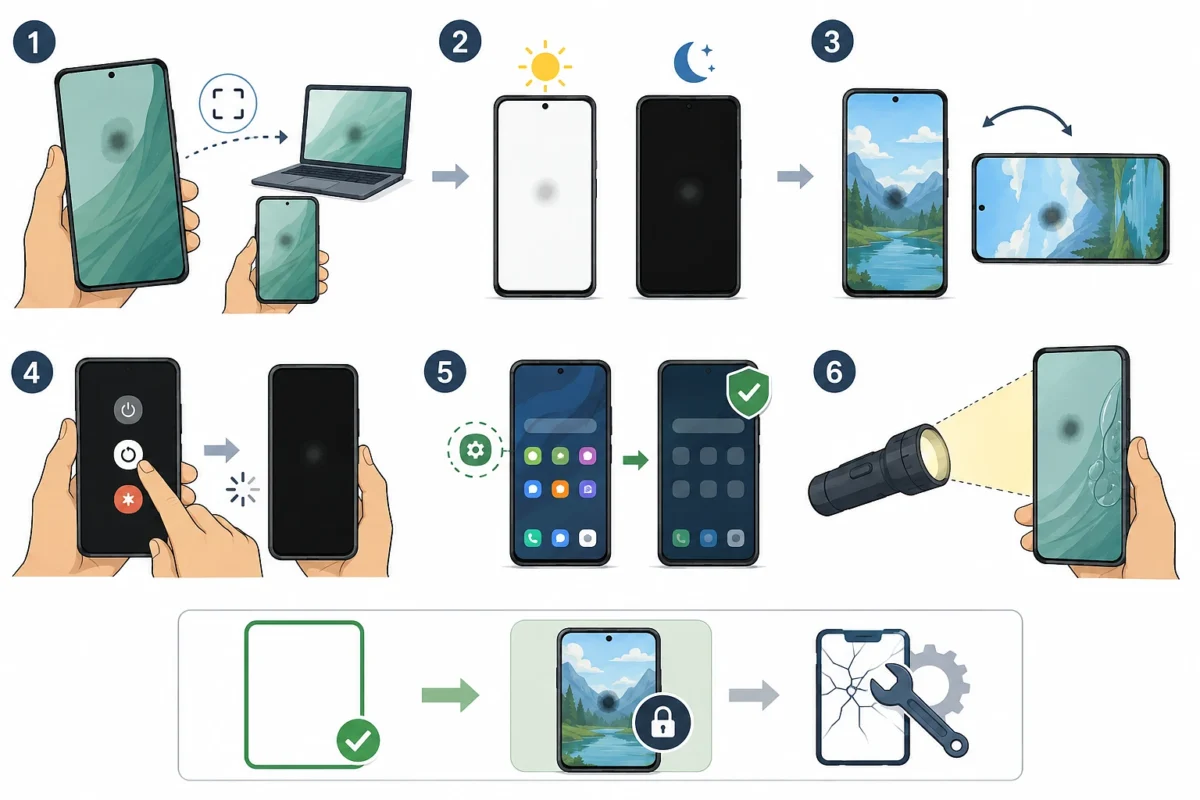
I have watched more than one person book a paid repair for something that was never a hardware fault. A stuck notification overlay, a badly rendered wallpaper, a burned in navigation bar and a genuine backlight defect can look similar at a glance. These checks separate them and take about two minutes.
- Take a screenshot with the mark on screen, then view that screenshot on a computer or another phone, because a fault that copies across is in the image and not the glass
- Open a plain white image, then a plain black one, since backlight faults shout on black and dirt shouts on white
- Rotate the phone and see whether the mark rotates with the content or stays fixed to the physical screen
- Restart the phone, which clears a surprising number of temporary rendering glitches
- Boot into safe mode on an Android device to rule out a misbehaving app, using the display and repair guidance in the official Pixel help centre as a reference point for your model
- Shine a torch through the screen from the side in a dark room, which often reveals a bubble or a separated area you cannot otherwise see
If the screenshot is clean and the mark stays fixed to the glass through every test, you are dealing with hardware. That single conclusion changes everything you do next, and it costs nothing to reach.
Cleaning Properly Before Assuming The Worst
Cleaning sounds too obvious to be worth a section, until you see how many screens are damaged by the wrong cleaning method. Cheap glass cleaner, kitchen spray and alcohol wipes with high concentrations can strip the oleophobic coating, and once that coating goes patchy the screen looks permanently hazy in exactly the way people describe as white spots.
| Do This | Avoid This |
|---|---|
| Dry microfiber cloth first, in slow circles | Paper towel, tissue or a shirt sleeve |
| Slightly damp cloth with plain water if needed | Spraying liquid straight onto the phone |
| A very light touch, letting the cloth do the work | Fingernails or scraping at a stubborn mark |
| Diluted isopropyl on the cloth for stubborn residue | Window cleaner, vinegar or anything with ammonia |
| Cleaning with the phone powered off | Wiping while the screen is warm from use |
The screen protector deserves separate attention. Tempered glass protectors are held on by an adhesive layer that fails from the edges inward, and when it fails you get an unmistakable pale patch with a hard boundary. Peel a corner back gently and look at the mark from the side. If it disappears when the protector lifts, you have your answer and a replacement protector costs a fraction of a repair. Warming a protector slightly with your hands and pressing outward from the centre sometimes reseats a small lifted area, though once the adhesive has collected dust it rarely holds for long.
Pressure Marks From Ordinary Daily Habits
Pressure damage is the cause I see most often in real life, and almost nobody connects it to their own routine. Constant force on one part of the panel squeezes the layers together and leaves a bright mark. On LCD screens these marks sometimes fade over days once the pressure stops. On OLED screens they usually do not.
| Everyday Habit | Why It Presses On The Panel | What To Change |
|---|---|---|
| Phone in a back pocket | Full body weight through a small area every time you sit | Front pocket or bag |
| Case that is slightly too tight | Constant force at the corners and edges | Case with a little clearance and a raised lip |
| Phone under a laptop in a bag | Repeated point loading during travel | A padded sleeve or a separate pocket |
| Car mount with a spring clamp | Sustained squeeze on the sides for hours | Magnetic or cradle style mount |
| Sleeping with the phone in the bed | Elbows and knees land on it overnight | Bedside table |
| Heavy items stacked on the phone at a desk | Slow, steady pressure that people never notice | Keep the surface clear |
Marks from pressure often appear a day or two after the event, which is why people swear the phone was fine yesterday. If the mark is new and you can identify a plausible pressure source, remove the source and give it a week before you spend money. I have seen faint pressure marks on LCD handsets shrink noticeably in that time, and I have also seen them stay forever. Both outcomes are normal.
Heat Is The Cause Almost Everyone Overlooks
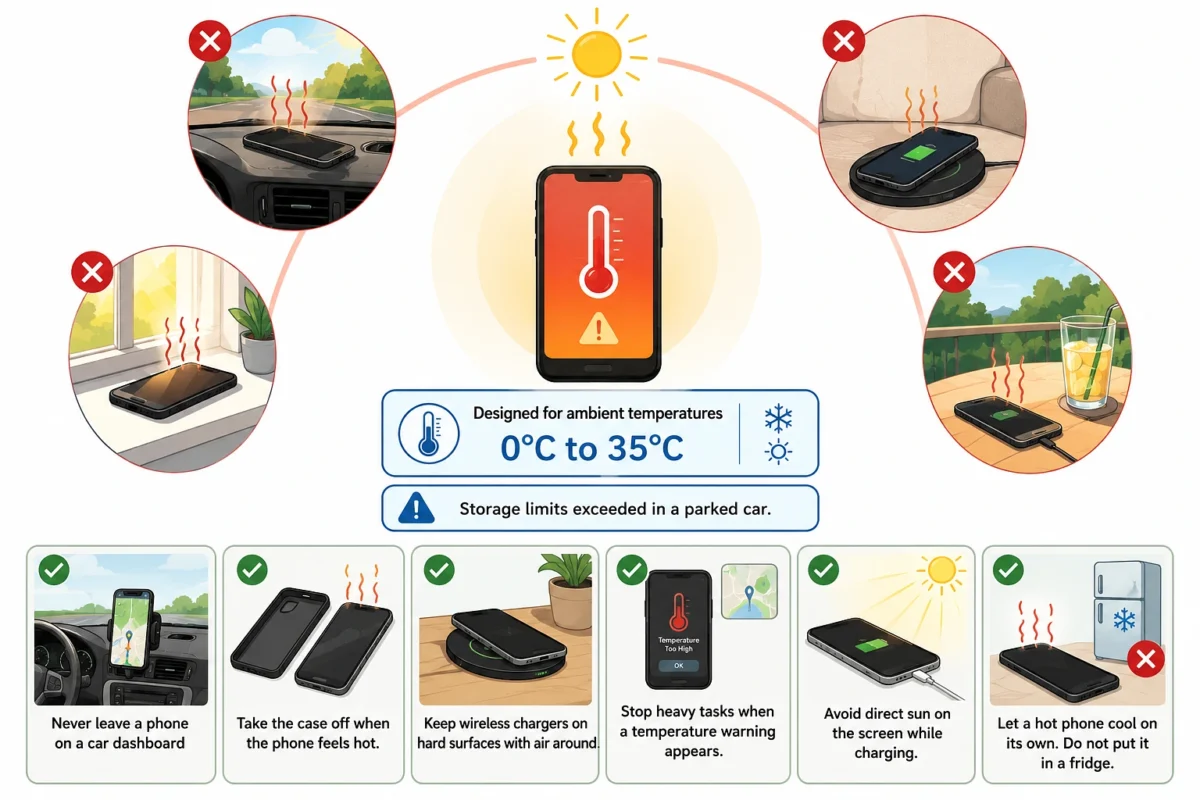
Heat is quietly responsible for a lot of permanent screen discolouration, and it rarely happens the way people imagine. It is not usually a single dramatic event. It is a dashboard in summer, a windowsill, a wireless charging pad on a sofa arm that never gets airflow, or a phone left face up on a bright balcony table during lunch.
Manufacturers publish operating ranges for a reason, and Apple states that its phones are designed for ambient temperatures between 0 and 35 degrees Celsius, with storage limits that a parked car easily exceeds. Other makers publish similar figures. Adhesive layers soften above those ranges and polarizers can discolour, which shows up as pale or cloudy patches that no amount of cleaning will touch.
- Never leave a phone on a car dashboard, even for a short errand on a mild day
- Take the case off when the phone feels hot, since most cases trap heat against the screen
- Keep wireless chargers on hard surfaces with air around them rather than on beds or cushions
- Stop heavy tasks such as navigation and video recording when a temperature warning appears
- Avoid direct sun on the screen while charging, which stacks two heat sources together
- Let a hot phone cool on its own instead of putting it in a fridge, because rapid cooling causes condensation inside
Moisture Under The Glass And The Rice Mistake
A milky patch that appears after rain, a humid bathroom or a spill is usually moisture that has worked its way between layers. Time and airflow are the only tools that reliably help, and the popular emergency trick actively hurts. Apple now tells users plainly not to put a wet phone in rice, advice that was widely reported when the guidance changed and is summarised in this NPR piece on what to do with a wet phone. Rice grains and dust get into ports, and the method does not dry anything faster than open air.
| Helpful | Harmful |
|---|---|
| Power the phone off straight away | Charging it to see if it still works |
| Tap gently with ports facing down | Shaking hard, which pushes water inward |
| Leave it upright in a dry room with moving air | Sealing it in a bag of rice |
| Give it a full day before judging the mark | Deciding after an hour that it is ruined |
| A fan at room temperature nearby | A hairdryer, oven, radiator or direct sun |
| A professional check if the mark persists | Opening the phone yourself to wipe the panel |
Water resistance ratings are worth understanding here too. They are tested in laboratory conditions with new devices, and seals age. A three year old phone that survived a splash last summer may not survive the same splash today, which is exactly why moisture marks show up on older handsets far more often.
Stuck Pixels Are A Different Problem Entirely
A single bright dot that never moves is not a backlight fault. It is almost certainly a pixel or subpixel stuck in an on state. The distinction matters because stuck pixels occasionally recover and blotches almost never do.
| Feature | Stuck Pixel | Backlight Or Layer Damage |
|---|---|---|
| Size | About the size of a pinhead | Anything from a coin to a large patch |
| Edges | Sharp and defined | Soft and gradual |
| Behaviour on black | Bright point | Diffuse glow |
| Behaviour on white | Usually invisible | Often still visible |
| Chance of self recovery | Small but real | Effectively none |
| Sensible response | Try a pixel cycling video, then accept it | Get a quote for replacement |
Cycling videos that flash rapid colours over the affected area are harmless to try for a few minutes and sometimes free a stuck subpixel. What I would not do is the massage technique that circulates online, where you press the dot firmly with a cloth wrapped fingertip. I tried it once on an old handset with one stuck pixel and turned a single dot into a visible bright smear that never went away. Pressing on a panel to fix a fault caused by pressure has never made much sense, and my own experience matched that logic painfully.
The Fixes I Tried That Did Not Work
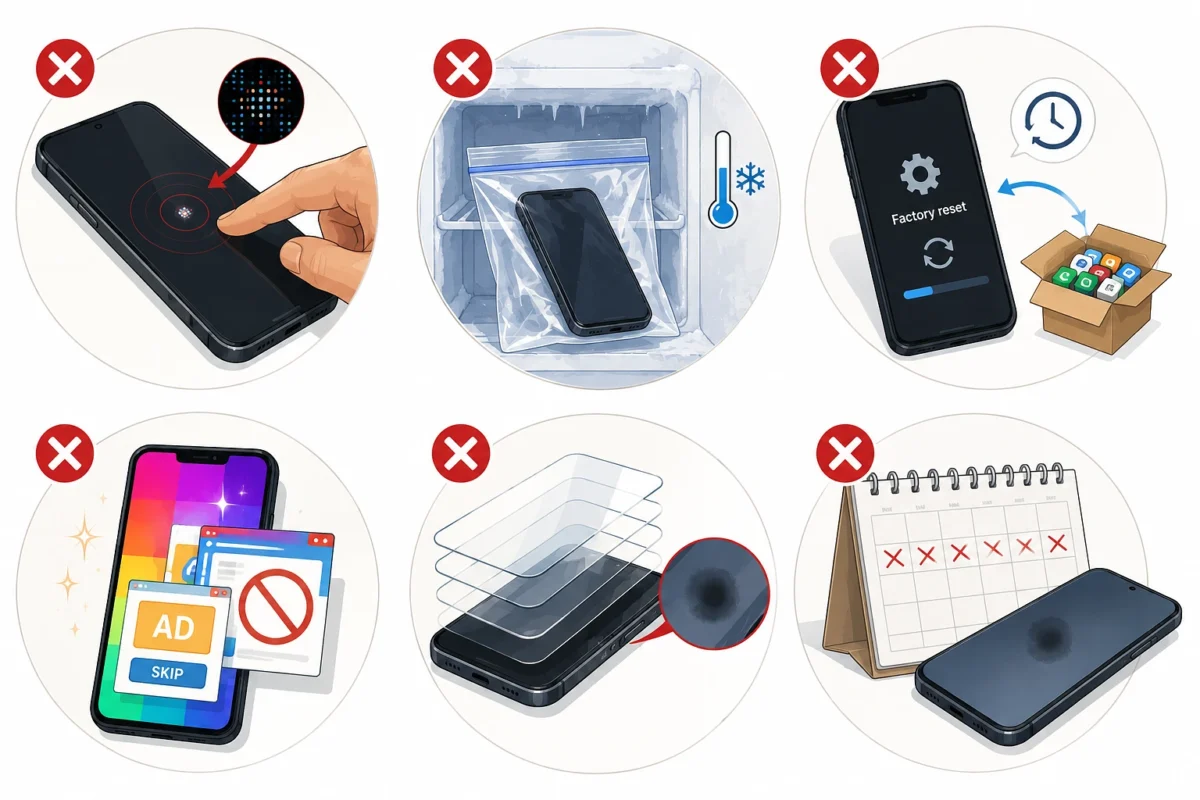
Honest reporting of failures is more useful than a list of tips that always succeed, so here is what wasted my time.
- Pressing and rubbing a stuck pixel, which made a small fault into a bigger one
- Putting a phone in the freezer inside a bag, a trick I found on a forum that risks condensation and achieved nothing
- A full factory reset for a mark that had already failed the screenshot test, which cost an evening of restoring apps
- A free app promising to repair screen damage, which turned out to be a flashing colour wallpaper with adverts
- Replacing a screen protector three times before noticing the mark was under the glass, not above it
- Waiting four months hoping a pressure mark on an OLED would fade, which taught me that LCD advice does not transfer to OLED
The pattern in every one of those failures is the same. I acted before I identified the layer. Two minutes of testing would have saved every hour I lost.
What The Repair Counter Actually Sees
A friend runs a small phone repair shop, and over several months I noted down what walked through the door with a white spot complaint. This is a rough tally from one shop rather than a study, so treat it as a pattern and not a statistic, but the shape of it has held true everywhere I have asked since.
| Reported Problem | How Common | What It Turned Out To Be |
|---|---|---|
| “There is a white mark on my screen” | Most frequent | Screen protector adhesive failure in a large share of cases |
| “It appeared overnight” | Very common | Pressure damage from a pocket or a bag |
| “It came after a hot weekend” | Regular | Heat affected adhesive, not repairable without replacement |
| “There is a dot that will not go” | Regular | Stuck pixel, usually left alone once explained |
| “It got worse after I tried a fix” | Occasional but memorable | Pressing, scraping or heat applied by the owner |
His summary, offered while handing back a phone that needed nothing more than a new protector, was that the customers who lose money are the ones who work backwards from a repair they already decided on. The ones who bring the phone in untouched almost always leave with a smaller bill.
Repair Choices, Costs And The Warranty Question
If testing points to real internal damage, the repair is a screen replacement. Prices vary enormously by model and region, so treat the bands below as a way to compare options rather than a quote.
| Option | Rough Cost Band | Worth Knowing |
|---|---|---|
| Manufacturer service | Highest | Genuine parts, keeps features such as brightness sensors working correctly |
| Authorised partner | High | Similar parts and process, often faster locally |
| Reputable independent shop | Middle | Ask specifically which grade of panel they fit |
| Cheap aftermarket panel | Lowest | Colour, brightness and touch response are often noticeably worse |
| Doing it yourself | Parts only | High risk of cracking the panel or damaging cables |
| Living with it | Free | Reasonable if the mark sits at an edge and is not spreading |
Two points people get wrong. First, an aftermarket panel can look acceptable in a shop and disappointing at home, because the difference shows up most in dim rooms and on dark content. Ask to see the phone displaying a black image before you pay. Second, using an independent repairer does not automatically strip your consumer rights in the way that warning stickers imply, and the Federal Trade Commission has warned companies about warranty practices that restrict the right to repair. Rules differ by country, so check your own regulator, but do not assume a sticker settles the matter.
For a phone still under warranty, book an official check before anyone else opens it. Most makers offer a diagnostic appointment at no cost, and the booking route for Samsung devices sits on Samsung’s own support pages alongside their device diagnostic tools. A documented manufacturer assessment is also useful evidence if the fault later turns out to be a known defect.
Habits That Stop New Spots Appearing
Prevention here is unusually effective because the main causes are all behavioural rather than random.
| Habit To Build | What It Prevents |
|---|---|
| Front pocket or bag instead of back pocket | Pressure marks from sitting down |
| A case with a raised lip and a little give | Edge pressure and impact damage |
| Removing the case during heavy charging | Trapped heat against the panel |
| Replacing a protector as soon as edges lift | Dust and adhesive haze under the glass |
| Keeping the phone out of parked cars | Heat damage to adhesive and polarizers |
| A quick monthly look at a plain white screen | Catching small faults while they are still cheap |
That last one sounds fussy and takes ten seconds. A mark caught while a protector is lifting costs the price of a protector. The same mark ignored for two months while dust works in can cost a screen.
Questions People Ask Most Often
Will a white spot spread? Marks from pressure and stuck pixels usually stay the same size. Marks from moisture, heat and impact damage often grow, so photograph the spot next to something for scale and compare in a fortnight.
Does a factory reset help? Only if the screenshot test showed the fault in the image. For a hardware mark it changes nothing and costs you a day of setup.
Is it safe to keep using the phone? Generally yes, provided the glass is not cracked. A cracked screen with a white area is a different matter because moisture and dirt reach the panel through the crack.
Are OLED and LCD really that different? Yes. LCD pressure marks sometimes recover because the layers can settle back. OLED damage tends to be permanent because the light emitting layer itself is affected.
Should I buy a screen repair app? No. Nothing installed on the phone can reach a physical layer under the glass. The only software worth trying is a pixel cycling video for a single stuck dot.