
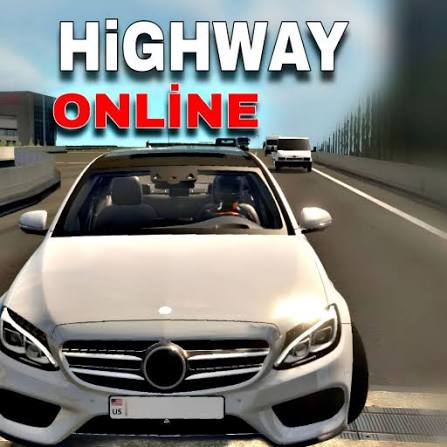


Highway Traffic Online Drive
Highway Traffic is an endless browser driving game where you weave through busy highway lanes at high speed, score points for close passes, and spend credits on faster cars and upgrades.
Highway Traffic Online Drive puts you behind the wheel on a crowded highway where the only goal is to stay alive and keep your speed up for as long as you can. You weave between cars, buses and trucks, and every close pass adds points to your score and builds a combo. The faster you go, the less time you have to react, so one late lane change can end the whole run. Credits from each drive go into new cars, paint and performance parts.
| Game Detail | Information |
|---|---|
| Game | Highway Traffic |
| Developer | Not publicly credited |
| Genre | Endless traffic driving, arcade racing |
| Gameplay | Dodge traffic at speed, score near misses, buy cars and upgrades |
| Controls | WASD or arrow keys, Space for e-brake, F or Left Shift for nitro, C for camera |
| Supported Devices | PC, laptop, Chromebook, phones and tablets in a browser |
| Multiplayer | No, single player |
| Main Goal | Drive as far as possible without crashing and post a high score |
| Android App | No official app |
How A Run On The Highway Actually Works
Every run starts with your car already on a busy road. Traffic keeps coming, and your job is to hold a high speed while slipping through the gaps. The game rewards risk: when you pass another vehicle very closely, you get a near miss bonus, and several near misses in a row build a combo multiplier.
A crash ends the run. Your points then turn into credits, which you spend in the garage. That loop is the whole hook. You drive, crash, upgrade, and come back a little faster each time.
The real skill is reading gaps two or three cars ahead, not just the car in front of you.
Highway Traffic Controls On Keyboard And Touch
The game uses a standard driving layout on a computer and on-screen buttons on phones and tablets.
- W or Up Arrow: accelerate
- S or Down Arrow: brake
- A or Left Arrow: steer left
- D or Right Arrow: steer right
- Space: e-brake
- F or Left Shift: nitro, once you have bought the nitro upgrade
- Q and E: left and right indicators
- C: change the camera view
The indicators do nothing for your score, but they are a nice touch if you like driving with style.
The Four Modes And What Each One Tests
Highway Traffic gives you four ways to play, and each one asks for a slightly different habit.
One Way
All traffic moves in your direction. This is the easiest mode and the best place to learn how the cars handle and how big the gaps really are.
Two Way
Oncoming traffic is added to the opposite lanes. Driving on the wrong side pays the biggest bonuses, but a head-on crash comes very fast, so only cross over when you can see a clear stretch.
Time Attack
You try to cover as much distance as possible before the clock runs out, passing checkpoints along the way. Speed matters more than style here.
Speed Bomb
You drive a bus fitted with a bomb. If your speed drops too low, the bomb’s health drains, so you have to steer around traffic instead of braking.
You can also pick the weather: sunny, night or rain. Night and rain cut down how far ahead you can see, which makes every mode harder.
Cars, Paint And Performance Upgrades
You start with an Audi Quattro style car. As credits build up, you can buy other models, including a Sierra Cosworth, a van, an American muscle car and a Lambo, which is the most expensive car in the garage.
Upgrades come in three groups:
- Visual: paint colours, rims and police lights
- Performance: engine, handling and brakes, each with five levels
- Special: nitro and turbo, which you switch on once bought
A good order is handling and brakes first, then engine. Extra top speed is useless if the car cannot change lanes quickly enough to use it.
Tips That Keep You Alive At High Speed
- Use the camera view that shows the most road ahead. A higher view helps you spot a blocked lane before you reach it.
- Stay in a middle lane when you can. It leaves you two escape routes instead of one.
- Tap the steering keys instead of holding them. Long presses at high speed make the car swing too far into the next lane.
- Save nitro for a straight, open stretch. Firing it in heavy traffic is the fastest way to end a run.
- In Two Way mode, cross into oncoming traffic only for short bursts to grab the bonus, then come back.
- In Speed Bomb, look for gaps early. Braking hard is not an option, so plan your line well in advance.
Who Made Highway Traffic And Where It Comes From
Highway Traffic is a free HTML5 driving game that is shared across many browser game portals. The developer is not publicly credited on the major game portals that host it, and no official release date is listed, so this page does not name one. What is clear is that the game is built for the browser, with keyboard controls on computers and touch buttons on mobile. You can read a full mode and car breakdown in this Highway Traffic guide on Drifted.
Playing Highway Traffic Online In A Browser
The “online drive” part of the name simply means you play it straight in a web page. There is nothing to install. It runs in Chrome, Edge, Firefox and Safari, and it works on a Chromebook as well as on a Windows PC or a Mac. Because it uses HTML5 and WebGL, it does not need the old Flash plugin, which stopped working after December 31, 2020.
The game is single player, so “online” does not mean you race other people. It means your browser loads the game from the web each time. Progress such as credits and cars is usually kept in your browser’s storage, so clearing your site data can reset your garage.
If you play at school or work, stick to your network’s rules about games.
Getting Smooth Frames On A Slow Laptop
Traffic games feel bad when the frame rate drops, because you lose time to react. A few simple fixes help:
- Close other tabs, especially video sites.
- Turn on hardware acceleration in Chrome under Settings, then System.
- Use the full-screen button or press F11 so the game has your whole screen.
- Plug in your laptop. Many laptops slow down the graphics chip on battery.
Games Like Highway Traffic
If you enjoy the speed and close calls, try Extreme Car Driving Simulator Web for open city driving, Drift Hunters Chromebook Version for car tuning and drifting, or Top Speed Racing 3D Unblocked for an open world with drift and time trial events.
Highway Traffic FAQ
Is Highway Traffic Free To Play?
Yes. It is a free browser game. All cars and upgrades are bought with credits you earn by driving.
Can You Play Highway Traffic On A Phone?
Yes. The game shows on-screen buttons on phones and tablets, so you can steer and accelerate with touch.
Is There A Multiplayer Mode?
No. Highway Traffic is single player. You compete against your own best score.
Related Categories
- Driving Games
- Racing Games
- Arcade Games
- Car Games
About This Game
Highway Traffic keeps things simple: one road, endless cars and a score that grows the braver you drive. Four modes and three weather settings keep it fresh after the first few runs.
Start in One Way to learn the handling, then move to Two Way when you want bigger bonuses and bigger risks.












Reviews
There are no reviews yet.