

Moto Road Rash 3D Online
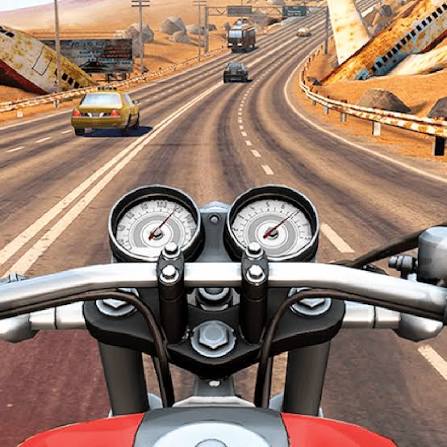
Moto Road Rash 3D is a free browser motorbike game where you ride through a 3D city in Career, Endless, Time Trial and Free Ride modes, braking smartly to avoid crashes.
Moto Road Rash 3D Online is a free 3D motorbike game for the browser where you ride through a large city, finish level goals and unlock new stages as you go. It offers four ways to play: Career, Endless, Time Trial and Free Ride, so you can chase targets or just cruise around. The bike is quick and the streets are busy with corners and obstacles, which means one wrong turn at full speed sends you sliding. Learning when to brake is what separates a clean run from a crash.
| Game Detail | Information |
|---|---|
| Game | Moto Road Rash 3D |
| Developer | Not publicly credited on the main game portals |
| Genre | Motorbike racing, 3D driving |
| Gameplay | Ride a motorbike through a 3D city, clear career levels or ride freely |
| Controls | Arrow keys to accelerate, brake and steer |
| Supported Devices | Web browser on desktop, laptop and Chromebook |
| Multiplayer | No, single player |
| Main Goal | Complete career levels and unlock the rest of the city |
| Android App | No official app |
The Four Game Modes And Which One To Start With
Career Mode
Career is the main part of the game. It takes place in a large city, and you clear levels one by one to unlock more of it. Each level gives you a target to reach, so this is where you build real skill. Most players should start here.
Endless Mode
Endless keeps you riding as long as you can avoid crashing. It is a good test of focus, because the longer you last, the more one slip hurts.
Time Trial Mode
Time Trial is all about speed. You ride a set route against the clock and try to beat your own best time.
Free Ride Mode
Free Ride removes the goals. You can explore the city, practise cornering and learn the map without pressure.
Moto Road Rash 3D Controls
- Up Arrow: accelerate
- Down Arrow: brake
- Left Arrow: steer left
- Right Arrow: steer right
The controls are simple on purpose. All the skill is in timing your braking and picking good lines through corners.
How Riding A Bike In 3D Differs From A Car Game
A motorbike turns sharply but loses grip fast when you steer hard at top speed. In a car game you can often slam into a wall and keep going. On a bike, contact usually ends the run or costs you a lot of time. That is why patience pays off more here than in most driving games.
Brake before the corner, then accelerate out of it. This one habit fixes most crashes for new players.
Tips For Clearing Career Levels Faster
- Use Free Ride to learn the city first. Knowing which streets lead where saves time in Career and Time Trial.
- Look ahead, not at your bike. Your eyes should be on the next turn, not the one you are in.
- Do small steering inputs at high speed. Tapping the arrow key is safer than holding it down.
- If a level keeps beating you, slow down for one run just to finish it, then try for speed after.
Is Moto Road Rash 3D Related To The Original Road Rash
No. The name borrows from Road Rash, the classic motorbike racing series from Electronic Arts that first came out in 1991 and was famous for its fighting on the road. You can read about that series on the Road Rash Wikipedia page. Moto Road Rash 3D is a separate browser game and not an official EA title. It shares the idea of fast bikes on open roads, but it plays as its own game.
How Moto Road Rash 3D Online Runs In Your Browser
Moto Road Rash 3D Online is played directly in the browser, with nothing to install. It uses WebGL, the browser technology for 3D graphics, so it runs on most laptops and Chromebooks with a working graphics chip.
If the game feels slow, try these fixes:
- Close other browser tabs and apps.
- Turn on hardware acceleration in Chrome under Settings, then System.
- Switch to full screen with the game’s button or F11.
If you play on a school or work device, follow that network’s rules about games.
Who Made Moto Road Rash 3D
The developer of Moto Road Rash 3D is not clearly credited on the main game portals that host it, and no official studio page could be confirmed. Several unofficial apps on mobile stores use similar names, but none can be confirmed as coming from the same maker. For that reason, this page sticks to what can be checked: the browser game, its four modes and its controls.
Is There An Official Moto Road Rash 3D Android App
No official Android app could be confirmed for this game. If you want a motorbike game on your phone, the Android link on this page goes to Moto X3M Bike Race Game by Ace Viral, a genuine and well known bike game. It plays very differently, with 2D stunt levels instead of 3D city streets, but it is a safe and real app rather than a copy.
Games Like Moto Road Rash 3D
Moto X3M Pool Party Unblocked is a good pick for short, trick based bike levels. If you enjoy riding in traffic, Highway Traffic Online Drive puts you on busy highways in a car. For more bike racing, Super Bike Wild Race Free is another free choice.
Moto Road Rash 3D FAQ
Is Moto Road Rash 3D Free?
Yes. It is free to play in your browser with no download.
Which Mode Is Best For Beginners?
Free Ride is the gentlest because there is no target to beat. Once you feel comfortable, move to Career mode.
Can You Play Moto Road Rash 3D On A Chromebook?
Yes. It runs in Chrome, so any Chromebook that handles 3D browser games should play it.
Related Categories
- Racing
- Driving
- Bike Games
About This Game
Moto Road Rash 3D Online gives you a big city, a fast bike and four ways to ride it. The controls are easy to pick up, and the real challenge is learning to brake at the right time.
Start in Free Ride, learn the streets, then take on the Career levels.










Reviews
There are no reviews yet.