
QWOP
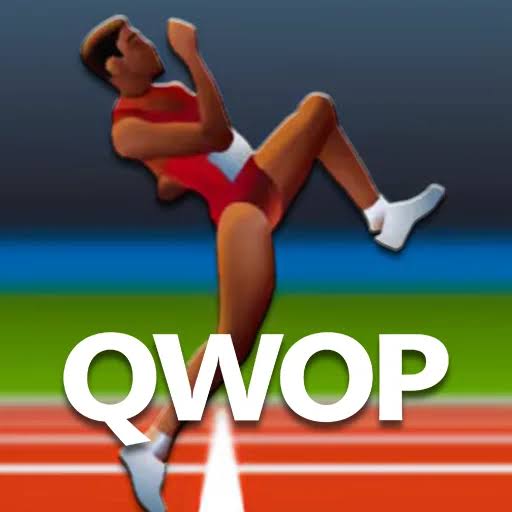
QWOP is a physics-based running game where you control an athlete’s thighs and calves with Q, W, O, and P while trying to complete a difficult 100-metre race.
QWOP is a physics-based running game created by Bennett Foddy where you control an athlete using only four keyboard keys. Q and W move the thighs, while O and P control the lower legs. Your goal sounds simple: move along a 100-metre track. Actually getting the runner to move without collapsing is the real challenge.
What makes QWOP memorable is that normal running instincts do not help much at first. Pressing keys quickly usually makes the athlete fold awkwardly rather than move forward. I found it much easier to think about one leg movement at a time and accept very small progress instead of trying to run normally from the first attempt.
| Game Detail | Information |
|---|---|
| Game | QWOP |
| Developer | Bennett Foddy |
| Genre | Sports / Physics / Skill |
| Gameplay Style | Physics-based 100-metre running challenge |
| Controls | Q, W, O, P |
| Supported Devices | Desktop and smartphones through HTML5 |
| Original Browser Release | November 2008 |
| HTML5 Update | 2016 |
| Original Technology | Flash |
| Current Web Technology | HTML5 / WebGL |
| Multiplayer | Single-player |
| Main Goal | Complete the 100-metre track |
Bennett Foddy’s official page describes QWOP as a game about running down a 100-metre track and confirms that he updated it to HTML5 in 2016 so players no longer need Flash.
Four Keys Control the Entire Runner
QWOP gets its name directly from its controls.
You use:
- Q: Controls one thigh movement
- W: Controls the opposite thigh movement
- O: Controls one lower leg
- P: Controls the opposite lower leg
The thighs and calves react independently, which is why pressing all four buttons without a plan usually makes the runner lose balance.
The original gameplay documentation explains that Q and W control the thighs while O and P control the calves.
The 100-Metre Goal
The main objective is to travel 100 metres.
There are no complicated objectives, equipment upgrades, or long menus.
Everything comes down to making the runner move forward without letting the body collapse onto the track.
That simplicity is exactly what makes the game difficult.
You immediately understand what you need to do, but controlling the movement takes much longer.
Why Walking Can Work Better Than Running
Trying to create a realistic sprint immediately is one of the easiest ways to fail.
QWOP’s physics reward balance before speed.
A slow sequence that moves the runner a few centimetres is still progress.
I would first learn how one pair of keys changes the legs before worrying about speed. Once you understand which movement pushes the body forward, you can start connecting those movements into something closer to a running rhythm.
Q and W Control the Thighs
Q and W work against each other.
One moves one thigh forward while the other leg moves backward, and W reverses that action.
That means these two keys have a major effect on the runner’s overall body position.
If the upper legs move too far without the lower legs supporting them, the body quickly becomes unstable.
Small taps are much easier to read than holding a key for too long.
O and P Control the Lower Legs
O and P control the calves.
These inputs help determine how the lower legs extend and where the feet end up relative to the body.
This becomes important because a thigh movement alone does not create a stable step.
The upper and lower legs need to work together.
Once I started thinking about the lower leg as the part that prepares the next contact with the track, the controls became slightly easier to understand.
Balance Matters More Than Speed
QWOP uses ragdoll-style physics.
Gravity and inertia affect how the joints move, so the runner does not simply perform a fixed animation when you press a button.
That means the same input can produce a different result depending on the body’s current position.
The useful question is not simply “which key moves forward?”
It is “what position is the runner already in before I press the next key?”
A Simple Starting Method
A useful way to begin is to avoid thinking about the full 100 metres.
Concentrate on getting one controlled movement.
Move one thigh.
Adjust the lower leg.
Watch whether the body shifts forward or backward.
Then make another small correction.
This is slower than trying to sprint, but it teaches you what each input actually does.
Do Not Hold Keys Too Long
Long key presses can create large movements that become difficult to recover from.
Short taps give you more control.
If one movement puts the runner into a reasonable position, stop pressing and check what happened before adding another input.
QWOP becomes much less confusing once you stop treating it like a conventional keyboard running game.
Falling Is Part of Learning
Most early attempts end quickly.
That is normal for the game’s design.
A failed run tells you which movement caused the balance to disappear.
Instead of restarting and pressing the same sequence faster, change one part of the movement.
That makes each attempt more useful.
The Hurdle Later in the Race
Historical versions of QWOP include an additional obstacle around the halfway point.
The runner encounters a hurdle after progressing through the track, adding another movement problem once normal running already feels difficult.
Reaching it is already an achievement for new players.
The safest approach is not to dramatically change your rhythm just because the obstacle appears.
Keeping control remains more important than rushing.
What Happens After 100 Metres
Completing the 100-metre race is the main challenge.
Historical descriptions also note an additional long-jump sequence after reaching the finish.
This gives successful players one more physics challenge after the already difficult race.
For most players, simply reaching the finish is the major goal.
QWOP on Mobile
Bennett Foddy updated the browser game to HTML5 in 2016.
His official page says the updated version should work on smartphones using on-screen buttons.
That means the current browser game is not limited to old desktop Flash setups.
The interaction changes slightly on a touchscreen, but the same basic idea remains: independently control the runner’s legs and keep the body balanced.
QWOP for iOS
QWOP also received a separate iOS edition.
The mobile version changes the controls more substantially, letting players move their thumbs around on-screen control areas and tilt the device to influence the runner’s balance.
It also includes additional modes such as:
- 100m
- Hurdles
- Long Jump
- Steeplechase
- 50km Walk
These features belong to the dedicated iOS version rather than the original browser game.
Original Release
QWOP was created by Bennett Foddy in November 2008.
It began as a browser game on his own website and was originally built using Flash.
The game later became widely known online, especially around 2010, because players shared videos of how unexpectedly difficult the four-key control system could be.
HTML5 Update
Flash eventually became unsuitable for modern browsers.
Foddy solved that problem himself.
In 2016, he updated QWOP so it could run using HTML5 instead of requiring Flash.
That update is important because it keeps the original game playable in modern browsers without relying on discontinued browser plugins.
Who Created QWOP?
QWOP was created by Bennett Foddy, an independent game designer.
His official site currently lists QWOP alongside games such as Getting Over It and Baby Steps.
Foddy became known for designing games where the controls are intentionally unusual and where learning movement is itself the main challenge.
QWOP is one of the clearest examples of that design style.
2QWOP
Foddy later made a two-player version called 2QWOP.
It was released in February 2012 and turns the original idea into a split-screen race between two players.
The control layout changes:
one player uses one group of keys,
while the second player receives another.
Foddy also warned that ordinary keyboards may struggle when many keys are pressed at the same time.
Unlike the main QWOP game, 2QWOP has not been converted to HTML5 according to the developer’s current page.
Is QWOP Multiplayer?
The standard QWOP browser game is single-player.
Your goal is simply to control the runner and complete the track.
If you want the official two-player variation, Bennett Foddy created the separate 2QWOP version rather than adding multiplayer to the standard game.
Why QWOP Feels So Difficult
The difficulty comes from separating movements that your brain normally treats as automatic.
When you walk or run in real life, you do not consciously decide how far each thigh and calf should move.
QWOP asks you to make those decisions manually.
That creates four problems at once:
- Leg coordination
- Balance
- Timing
- Momentum
The controls are simple, but coordinating them is not.
A Better Way to Improve
Do not measure progress only by distance.
First learn how to keep the runner standing.
Then learn one movement that moves the body forward.
Repeat it carefully.
After that, try connecting movements into a rhythm.
Once you can move consistently, begin thinking about speed.
This progression is much easier than trying to copy a normal sprint immediately.
QWOP vs Normal Running Games
Most running games simplify movement.
You may only need to jump, change lanes, or press one button at the correct moment.
QWOP does the opposite.
It makes the running movement itself the entire challenge.
There are no power-ups helping you move automatically.
You control individual parts of the legs and deal with the physics that follow.
That makes QWOP closer to a movement puzzle than a traditional athletics game.
Games Like QWOP
Players who enjoy QWOP may also like physics games where unusual controls create most of the difficulty.
Get On Top is a strong related game for Prothots because it was also created by Bennett Foddy and uses balance and physics as the main challenge.
Other suitable internal connections include physics-based movement games where learning the controls matters more than upgrades or story progression.
Related Categories
QWOP fits naturally into:
- Skill Games
- Physics Games
- Sports Games
- Running Games
- Difficult Games
- Single-Player Games
- Browser Games
Its strongest identity is a physics skill game because learning how the body reacts is much more important than traditional racing strategy.
About QWOP
QWOP became memorable because it turns something ordinary into something surprisingly difficult.
Running 100 metres sounds like the simplest possible sports-game objective. But once every thigh and lower-leg movement becomes a separate keyboard decision, even moving a short distance can feel like progress.
The best way to approach it is not to fight the controls.
Learn them slowly.
Use small movements, watch how the runner’s balance changes, and build a repeatable rhythm before worrying about speed.
That is where QWOP becomes less random and starts feeling like a skill you can actually improve.









Reviews
There are no reviews yet.