
Space Waves Neon Platformer Unblocked
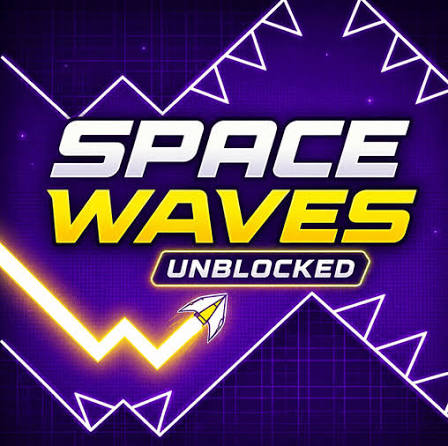
Space Waves Neon Platformer Unblocked is a free one-button arcade game where you steer a zigzagging arrow through tight paths full of walls, spikes and spinning gears to reach the end of each level.
Hold to go up, let go to come down: Space Waves Neon Platformer Unblocked runs on that single idea, and it still gets tough fast. In Space Waves you steer an arrow that zigzags through narrow paths packed with walls, spinning gears and spikes. Touch any of them and the run is over, and you restart at once. The challenge is that the arrow never stops moving, so you have to read each turn before you reach it.
| Game Detail | Information |
|---|---|
| Game | Space Waves |
| Developer | do.games, mobile version published by CrazyGames |
| Genre | Arcade, one-button skill game |
| Gameplay | Steer a zigzagging arrow through obstacle paths to the end of each level |
| Controls | Hold left mouse, W or Space to rise, release to fall, P to pause |
| Supported Devices | Desktop, phone and tablet browsers, Chromebook, Android, iOS |
| Release | April 2024 in browsers, July 2025 on iOS |
| Multiplayer | No, single player |
| Main Goal | Reach the end of every level without crashing |
| Android App | Yes – official |
Is Space Waves Really A Neon Platformer?
A lot of players search for Space Waves as a neon platformer, but it does not play like one. There is no running and jumping. You fly an arrow that moves at an angle, rising while you hold and falling when you let go, which draws a zigzag wave across the screen. If you have played the wave sections in Geometry Dash, the feeling is very similar. It is a pure reaction and timing game, built around one button.
That matters for what you expect. You will not find enemies to stomp or ledges to climb. Every level is a path from left to right, and your only job is to thread the arrow through it. If you like games where one clean run feels earned, that simple setup is exactly the appeal.
How Holding And Releasing Steers The Arrow
Your arrow is always moving forward. Holding sends it up on a diagonal. Releasing sends it down on a diagonal. That is the only input, so every gap, gear and spike is solved by deciding exactly when to switch between the two.
Short taps make small zigzags that keep you near the middle of a narrow tunnel. Long holds make big climbs for tall gaps. **Most crashes come from holding a fraction too long**, so learning to make tiny, quick taps is the skill that unlocks later levels.
Controls On Keyboard, Mouse And Touch
- Left Mouse Button (Hold): Rise.
- W Or Spacebar (Hold): Rise, if you prefer the keyboard.
- Release: Descend.
- P: Pause the game.
- Touch: On phones and tablets, hold the screen to rise and release to descend.
Tips For Getting Through Tight Sections
- Zigzag when obstacles are ahead. Steady small waves keep the arrow moving in straight, controlled lines.
- Look ahead, not at the arrow. By the time a gear is next to you, it is too late to react.
- Pick one input and stick with it. Spacebar and mouse feel slightly different, and switching between them throws off your timing.
- Use the P key to pause and rest your hand before a hard stretch.
- Learn levels in pieces. Every restart is instant, so treat early fails as practice for one section at a time.
Levels And Difficulty Faces
The browser version has 33 levels, and you can pick any one at any time. Each level is marked with a face that shows how hard it is. Green levels have wider gaps and gentler angles, which makes them good for learning the controls. Harder levels add more obstacles, tighter turns and more hazards. If you want to test your reactions right away, you can jump straight into a hard one.
The mobile app, published by CrazyGames, goes further. Its store listing describes more than 80 handcrafted levels, color coded from easy green zones to extreme red challenges, with free level selection and instant restarts.
Which Level To Start With
Start on a green level even if you play other rhythm games. The goal is to get a feel for how far one tap moves the arrow. Once that feels natural, step up one face at a time.
Who Made Space Waves
Space Waves was developed by do.games and released in browsers in April 2024. It is built with the Unity engine and was still getting updates in September 2026. The mobile version is published by CrazyGames, and version 1.0 of the Space Waves app on the App Store arrived on July 31, 2025. The official Android app is linked on this page.
Playing Space Waves Unblocked In Chrome
Space Waves runs in the browser on Chrome, Edge, Firefox and Safari with nothing to install, and it works on Chromebooks too. That no-install setup is why people look for it as an unblocked game. If you are on a school or work device, follow the network rules there and save it for free time.
Making It Smooth With No Lag
A timing game needs smooth frames. Close tabs you are not using, turn on hardware acceleration in Chrome under Settings, then System, and play in full screen to cut distractions. A wired mouse or the spacebar usually feels more precise than a laptop touchpad.
Games Like Space Waves
Geometry Dash Lite HTML5 Full Screen is the closest match, with its own wave sections and rhythm-based levels. G-Switch 3 Unblocked Free is another one-button game, but you flip gravity instead of steering a wave. Vector Browser Version Online is a fast reaction game where timing every jump and slide matters just as much.
Space Waves FAQ
How Many Levels Does Space Waves Have?
The browser version has 33 levels. The mobile app lists more than 80.
Can You Choose Any Level In Space Waves?
Yes. Level selection is open, so you can play any level at any time.
Is There A Space Waves App For Android?
Yes. CrazyGames publishes an official Space Waves app on Google Play.
Related Categories
- Arcade Games
- Skill Games
- One Button Games
About This Game
Space Waves takes one button and turns it into a real test of timing. You hold, release and zigzag your arrow through gears and spikes until a level finally clicks.
It runs free in your browser, works on Chromebooks and has official mobile apps, so you can chase the next hard level wherever you are.










Reviews
There are no reviews yet.