
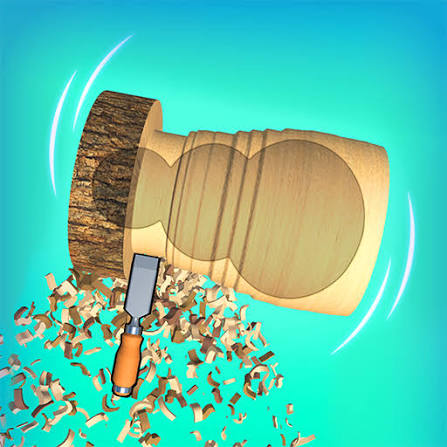


Wood Turning 3D Online Simulator
A relaxing lathe game where a wooden block spins in front of you and you shave it down with a chisel until it matches the target shape, then paint and finish the piece.
A spinning log, a sharp chisel and a target outline are all you get in Wood Turning 3D Online Simulator, a calm crafting game based on the Woodturning 3D formula that Voodoo made popular on phones. You press the tool into the turning wood, watch the shavings fly off, and try to copy the shape shown at the top of the screen as closely as you can. It looks easy until you cut one millimetre too deep, because wood you remove never comes back. The score depends on how close your finished piece is to the template, so patience beats speed every time.
| Game Detail | Information |
|---|---|
| Game | Wood Turning 3D Online Simulator (Woodturning 3D style) |
| Developer | Original Woodturning 3D mobile game by Voodoo; web versions are browser builds of the same idea |
| Genre | Simulation, Casual, Skill |
| Gameplay | Carve a spinning block on a lathe to match a target shape, then paint and polish it |
| Controls | Mouse drag or touch drag to move the chisel |
| Supported Devices | Desktop browsers, Chromebook, tablets and phones |
| Multiplayer | No, single player |
| Main Goal | Copy the target outline as closely as possible without cutting too deep |
| Android App | No official app verified (same-genre carving app linked) |
How The Lathe And Chisel Actually Work
Every level starts with a plain block of wood clamped on a lathe. The lathe spins the block fast, so any point where your chisel touches it gets shaved evenly all the way around. That is why the pieces you make are always round when you look at them from the end, like table legs, vases, chess pieces and bowls.
Above the block you see a faded template. Your job is to move the chisel left and right along the wood and push it in to the right depth at each spot. Push in a little and you take off a thin layer. Hold it in place and you keep carving deeper. The game compares your outline with the template when you finish and turns the difference into a score.
The one rule to remember: you can always cut more, but you can never put wood back.
Controls For Mouse And Touch
- Click and drag (mouse): move the chisel along the block and press it into the wood.
- Drag up or down: control how deep the cut goes at that spot.
- Release the button: lift the chisel away so it stops cutting.
- Touch and drag (phone or tablet): works the same way as the mouse, your finger is the tool.
- Tap the paint or finish buttons: pick a colour or pattern once the carving is done, if the version you play offers that stage.
Why Small Strokes Beat One Big Cut
New players often drag the chisel straight into the deepest part of the shape. The cut goes too far, the score drops, and there is no undo. A better habit is to work in passes.
Rough Out The Shape First
Make a few shallow passes along the whole block to get close to the outline. Leave a thin layer of extra wood everywhere. This gives you room to fix mistakes on the next pass.
Finish The Thin Parts Last
Narrow necks, like the middle of a chess pawn or the stem of a goblet, are where most runs go wrong. Carve the wide sections first, then come back to the thin parts slowly with short taps instead of long holds.
Watch The Edge Of The Template, Not The Wood
The shavings and the spinning motion can trick your eyes. Keep your attention on the faded outline. When the edge of the wood meets the line, lift the chisel straight away.
Levels, Shapes And The Paint Stage
Early levels use simple shapes like a cylinder with one groove. Later ones mix curves, sharp steps and narrow sections in the same piece. In Woodturning 3D style games the carving is usually followed by a decorating step, where you pick a colour, a pattern or a varnish and spin the piece again to apply it. Some web builds also unlock new chisel shapes or wood types as you clear levels.
The paint stage does not usually change how close your shape is to the template, so treat it as the fun reward at the end rather than a second test.
Who Made Woodturning 3D
Woodturning 3D is best known as a hyper-casual mobile game published by Voodoo, the French mobile game company behind many short, one-touch games. The idea later spread to consoles too, and Woodturning 3D has listings on Nintendo Switch, PlayStation and Xbox, including a Complete Edition on Switch.
The online simulator versions you find on game sites are browser builds of the same concept. They are not always made by the original publisher, so menus, levels and extras can differ a little from one version to another.
How Real Woodturning Compares To The Game
The game borrows from real woodturning, a craft where wood is shaped on a lathe with hand tools. In a real workshop the turner rests the tool on a support, holds it at an angle and removes wood slowly, which is the same patience the game rewards. Real turning also needs eye protection and careful technique, while the game lets you practise the idea of reading a shape with zero risk.
Playing It In A Browser With No Download
The online simulator runs straight in your browser using HTML5 and WebGL, the technology that lets modern browsers draw 3D graphics without plug-ins. That means it works in Chrome, Edge, Firefox and Safari, and on a Chromebook, with nothing to install.
If the game feels slow, a few simple fixes help:
- Close other tabs: 3D games share your computer’s memory with everything else that is open.
- Turn on hardware acceleration: in Chrome go to Settings, then System, and switch on “Use graphics acceleration when available”.
- Go full screen: use the game’s full-screen button or press F11 so the chisel is easier to aim.
If you play at school or work, follow your network rules. The game is light enough to play in a short break at home too.
Is There An Android App
The original Voodoo Android listing could not be confirmed for this page. The Google Play link on this page goes to Wood Turning 3D – Carving Game, a genuine lathe carving app with the same core idea: spin, carve, paint. Download apps only from the official Play Store page, not from random APK sites.
Games Like Woodturning 3D
If you enjoy slow, satisfying games where precision matters more than speed, try these:
- Sand Balls Classic Web Version: you carve paths through sand instead of wood, guiding balls down to a truck.
- Pull the Pin Puzzle Unblocked: another calm, one-touch puzzle where the order of your moves decides the result.
- Water Sort Puzzle 3D Browser: a relaxing sorting game with no timer pushing you.
Woodturning 3D FAQ
Can You Undo A Cut In Woodturning 3D?
No. Once wood is shaved off it is gone, so the safest method is to cut in shallow passes and finish the thin parts slowly.
Does Painting Change Your Score?
Usually not. The score comes from how close your carved outline is to the template, and painting is a decorating step afterwards.
Does The Online Simulator Work On A Chromebook?
Yes. It is an HTML5 browser game, so it runs in Chrome on a Chromebook without installing anything.
Related Categories
- Simulation
- Casual
- Skill
- Crafting and ASMR style games
About This Game
Wood Turning 3D Online Simulator takes a real workshop craft and turns it into a short, calm skill test. Each level asks the same simple question: can you stop cutting at exactly the right moment?
It suits anyone who likes satisfying visuals and slow, careful play. Take your time, cut in passes, and the high scores follow.






Related products


Among Us
-
Players: 4–15 online or local WiFi players.
-
Role Gameplay: Crew must complete tasks; Impostors secretly sabotage and eliminate.
-
Cross-Platform Play: Play on Android, iOS, PC, and consoles.
-
Party Game Fun: Best played with friends using voice chat for maximum strategy and deception.
-
Genres: Strategy, Indie, Action, Survival, Stealth, Party.



TEKKEN 8
-
Characters: 32 returning and new fighters, each with unique stories.
-
Gameplay: Fighting, Action, and Arcade-style combat with upgraded systems.
-
New Mechanics: Introduces the "Heat" system and "Tornado" hits for advanced strategy.
-
Online Features: Arcade Quest mode, tournaments, customizable avatars, and in-game currency.
-
Platform: Compete in thrilling matches across console and PC, alone or online.



Reviews
There are no reviews yet.