
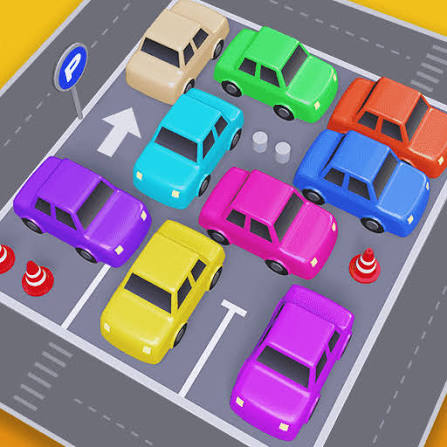


Parking Jam 3D Browser Free
A traffic puzzle set in a crowded car park. Each car can only drive straight forward or back, and you swipe them out one by one in the right order until the lot is empty.
Picture a car park so full that nobody can leave, and you have the starting point of Parking Jam 3D Browser Free. This browser version follows Parking Jam 3D by Popcore Games, where every level is a lot crammed with cars pointing in different directions. Each car can only drive straight forward or straight back, so you have to work out which one can escape first and which ones must wait. Choose badly and cars crash into each other, which costs you time and patience.
| Game Detail | Information |
|---|---|
| Game | Parking Jam 3D |
| Developer | Popcore Games |
| Genre | Puzzle, Logic |
| Gameplay | Swipe cars forward or backward to clear a jammed car park |
| Controls | Click and drag or swipe a car in the direction it should drive |
| Supported Devices | Desktop browsers, Chromebook, Android, iPhone and iPad |
| Multiplayer | No, single player |
| Main Goal | Get every car out of the parking lot |
| Android App | Yes – official |
Why Every Car Only Moves In A Straight Line
The single rule that drives the whole game is simple: a car can only move along its own length. It can roll forward or roll back, but it cannot turn on the spot. Once a car has a clear line to the road that runs around the car park, it drives out and joins the traffic.
If something is in the way, the car moves until it bumps into that obstacle and then stops. So the puzzle is really about clearing lines. Find the car with a clear path, move it, and see which new path opens up behind it.
How To Control The Cars
- Click and drag forward: send a car forward in the direction its nose points.
- Click and drag backward: reverse the car out of its spot.
- Swipe (touch screen): the same action with your finger on a phone, tablet or touch Chromebook.
- Restart button: reset the lot when you have trapped yourself.
A Simple Method For Clearing Any Lot
Start From The Edges
Cars on the outer rows usually have the shortest path to the road. Look for one whose front or back faces open space with nothing between it and the exit lane. Move those first.
Look For The Car Blocking The Most Others
In tighter levels, one car often sits across the paths of three or four others. Freeing that one car first opens many lines at once. Count how many cars each blocker is holding up and start with the biggest blocker you can move.
Use Reverse More Often
Most players only think about driving forward. Many cars actually have a clear line behind them. Always check both ends of a car before you decide it is stuck.
Watch The Road Around The Lot
A car that leaves the lot still has to reach the road around it. If anything moves along that road, wait a moment before sending the next car out. Waiting a second is better than a crash.
Levels, Obstacles And Rewards
The first levels use only a few cars so you learn the straight-line rule. Later lots get larger and more crowded, with longer vehicles that block more space and layouts where cars face every direction at once. The rule never changes, though, so the skill you build on easy levels carries straight into the hard ones.
A good way to improve is to replay a level you found hard and try to finish it with fewer bumps. Every crash means you moved a car before its line was clear, so fewer crashes is a fair sign that you are reading the lot better.
Who Made Parking Jam 3D
Parking Jam 3D was released on mobile by Popcore Games, a Berlin-based developer of free-to-play casual games. The same studio also made Pull the Pin and Tap Away, two more puzzles built around doing things in the right order. Parking Jam 3D is available on Google Play and on the iOS App Store.
The browser version on this page follows the same idea, so the tips above work on both.
Playing Free In A Browser
The browser version runs in a normal tab with HTML5 and WebGL, the web standard that lets browsers show 3D graphics. You can read more about it in MDN’s WebGL documentation. It needs no install and no account, and it works in Chrome, Edge, Firefox and Safari, as well as on Chromebooks.
If the cars stutter:
- Close other tabs: 3D scenes need memory and graphics power.
- Turn on hardware acceleration: Chrome Settings, then System, then “Use graphics acceleration when available”.
- Try full screen: the game’s full-screen button or F11 gives you a clearer view of the whole lot.
Parking Jam 3D Versus Classic Sliding Car Puzzles
Parking Jam 3D is close to the old sliding block puzzles where you move cars to free one red car. The difference is that here every car has to leave, not just one. That changes the thinking: instead of making space for one car, you are planning an order for the whole lot. It also means you can make progress even when the hardest car is buried, because removing easier cars first slowly frees up the middle.
Games Like Parking Jam 3D
- Pull the Pin Puzzle Unblocked: another Popcore puzzle where the order of moves is everything.
- Water Sort Puzzle 3D Browser: a calm sorting game with no time pressure.
- Hexa Sort 3D Online No Download: a 3D sorting puzzle that also rewards planning a few moves ahead.
Parking Jam 3D FAQ
Can Cars Turn In Parking Jam 3D?
Not inside the lot. A car only moves forward or back along its own line until it reaches the road outside.
Who Developed Parking Jam 3D?
Parking Jam 3D was developed by Popcore Games, the Berlin studio behind Pull the Pin.
Does Parking Jam 3D Work On A Chromebook?
Yes. The browser version runs in Chrome on a Chromebook with no download.
Related Categories
- Puzzle
- Logic Games
- Casual
- Driving
About This Game
Parking Jam 3D Browser Free turns a frustrating real-life moment into a tidy little logic puzzle. One rule, a handful of cars and a lot that needs emptying.
Start from the edges, free the biggest blocker, and remember that reverse is often the answer.













Reviews
There are no reviews yet.